Vocational schools (専門学校)
Academic affairs and career support for vocational schools, on one student record.
The homeroom teacher notices falling attendance, the career office checks grades before a recommendation, the office prepares certificates before graduation. Are you following the same student across separate ledgers?
Lines this school uses
- Take attendance
- Report an absence
- Review approved absences
- Count the rate, raise alerts
- Assign and follow up
- Check the record
- Enter and save scores
- Calculate final mark and grade
- Submit for review
- Approve or return
- Lock
- Ask for a review
- Approve and publish postings
- Apply
- Approve referrals
- Record selection stages
- Evaluate placements and internships
- Report the decision
- Register the residence card and passport
- Remind 90, 60 and 30 days ahead
- Apply for renewal
- Record the application date
- Record weekly work hours
- Produce lists and letters
What Classio is for vocational schools
A student information system for vocational schools that keeps attendance, grades, placements, careers and certificates on one record per student. Homeroom teachers, academic affairs and the career office work from the same record, each within their role.
Last updated: October 26, 2026
The vocational school year, and the records Classio keeps
A year shared by most vocational schools. Select an item to jump to that work.
First termAttendance rates and alert follow-up
End of termApproving and locking grades
Summer–autumnPlacements and logs
End of yearFinal grades and graduation certificates
Noticing falling attendance mid-term
Teachers take attendance for each lesson by register or QR code. Rates are counted from recorded lessons against the school’s threshold, leaving out excused absences such as bereavement, suspension and job hunting.
A rate below the threshold after at least 5 recorded lessons raises an alert. Homeroom and academic staff share the list and give each alert an owner and a due date.
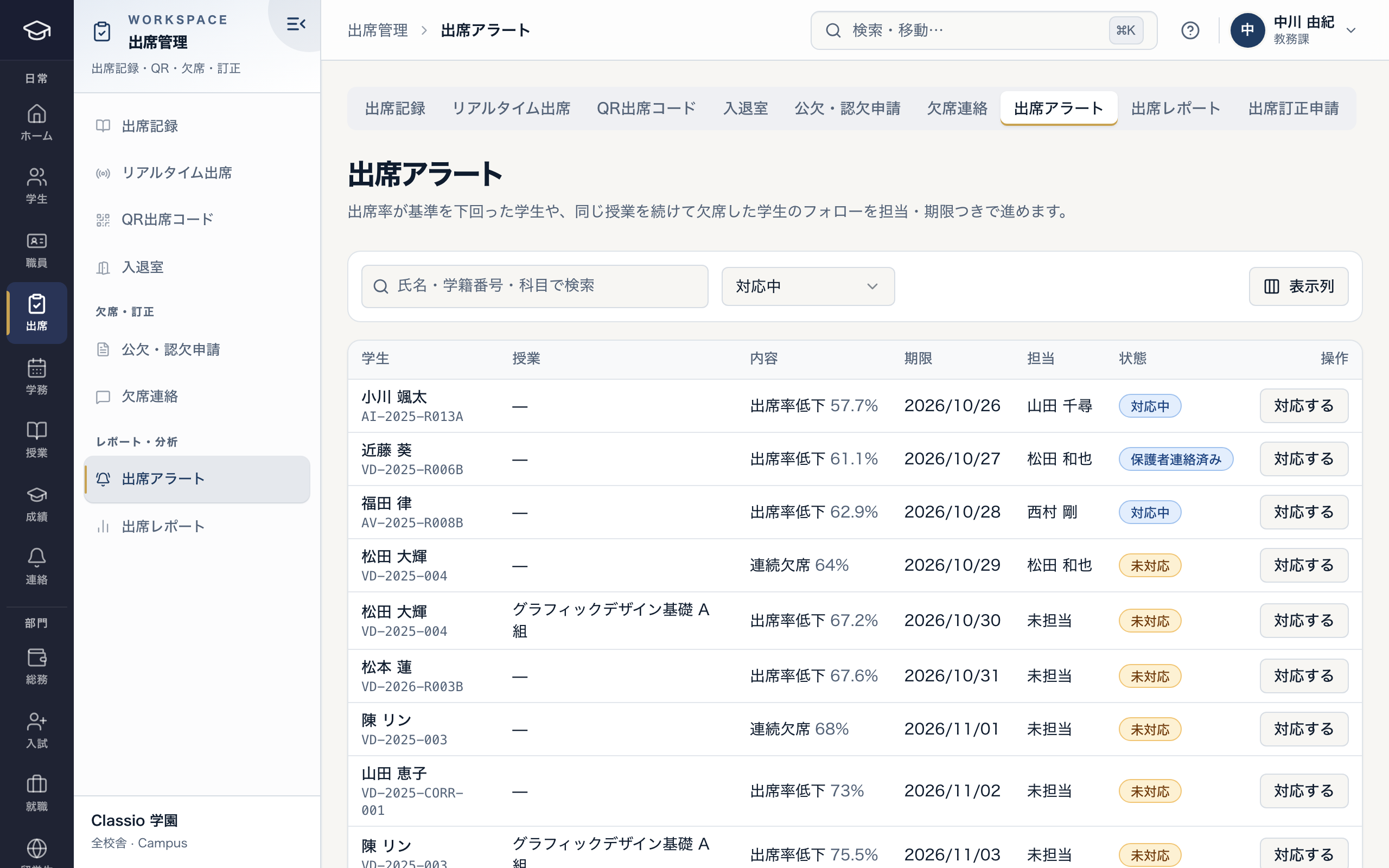
Attendance alerts with an owner and a due date
- Reason: low rate, consecutive absence
- A due date and an owner
- Open and in progress told apart
Approving and locking grades, and issuing certificates from them
Grades move through entry, submission, approval and locking; only locked grades are official, and student appeals are taken against locked grades.
Enrolment, transcript, expected-graduation, graduation, attendance and tuition-payment certificates are issued from a fixed preview once eligibility is checked, and only after a staff member other than the requester and the preview’s author approves it.
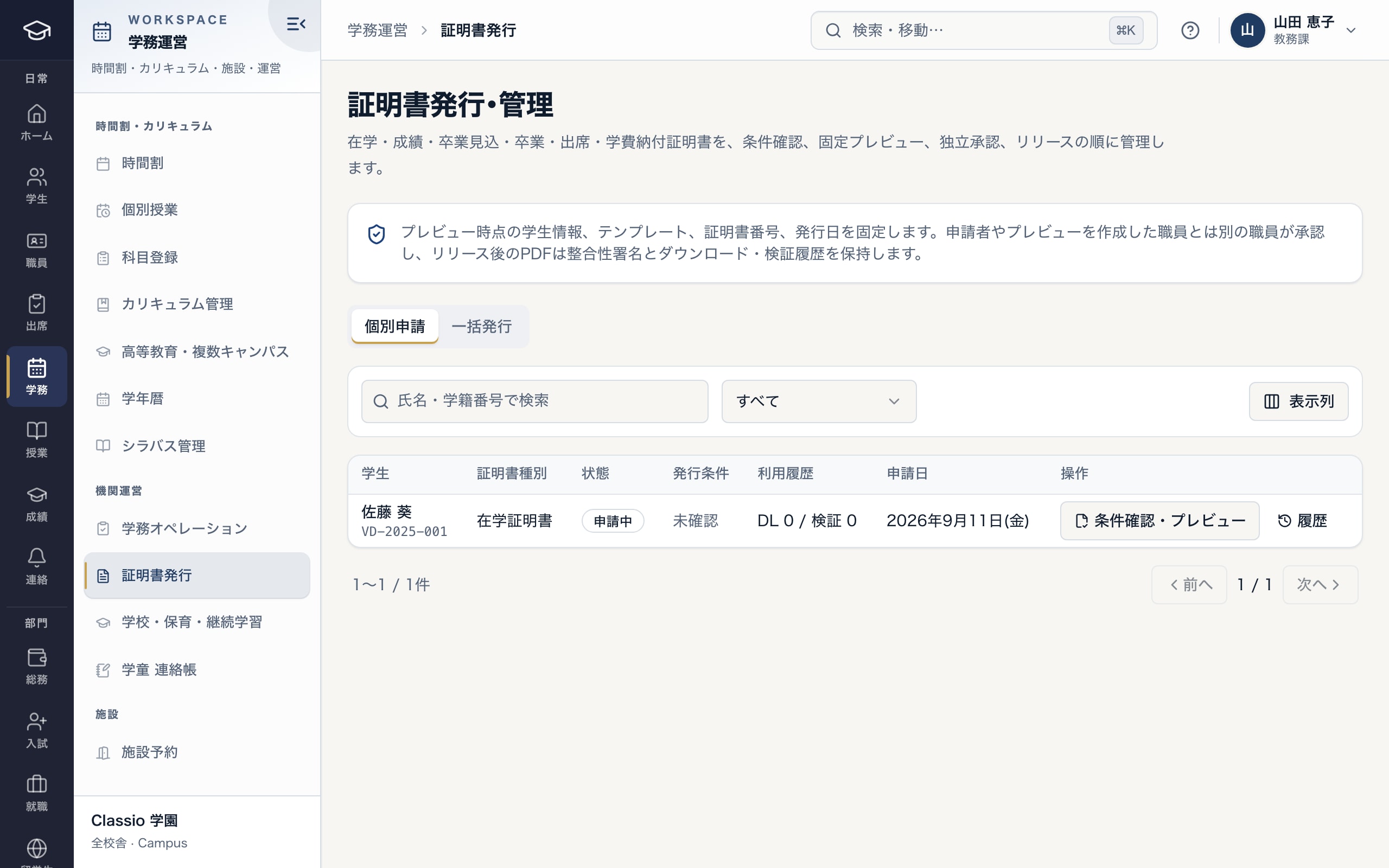
From request to eligibility check, preview, approval and release
- The preview is fixed; someone other than the requester approves
- Status of each request
- Check eligibility and create the preview
Keeping placements and logs on the student record
Record the placement, its dates, the review of logs, and the host’s acceptance and supervisor evaluation. One list shows each placement’s status and its days and logs so far.
Students gather work in a portfolio and choose who sees what; the school comments, recommends or hides items.
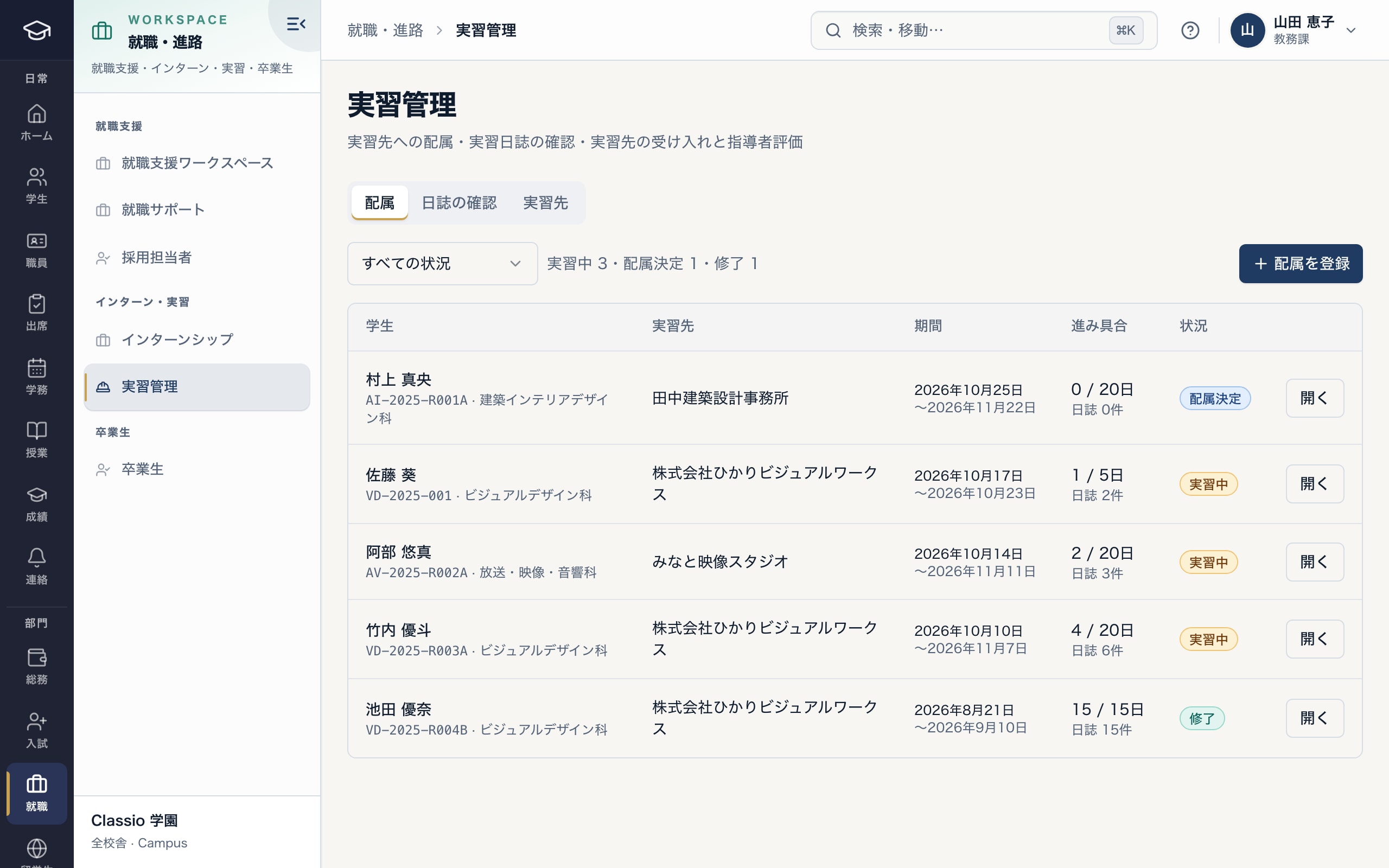
Placements, with days and logs so far
- Placements, log review and hosts in separate tabs
- Days of placement and logs submitted
- Assigned, in progress or completed
From job listings to recommendations, applications and offers
Job listings, company sessions and application progress are kept per student. School-recommended and open applications are told apart, and recommended applications move past “applying” only after the homeroom teacher approves.
Destination reports and exam reports are recorded too. The career office sees what its role needs; academic staff check grades and attendance.
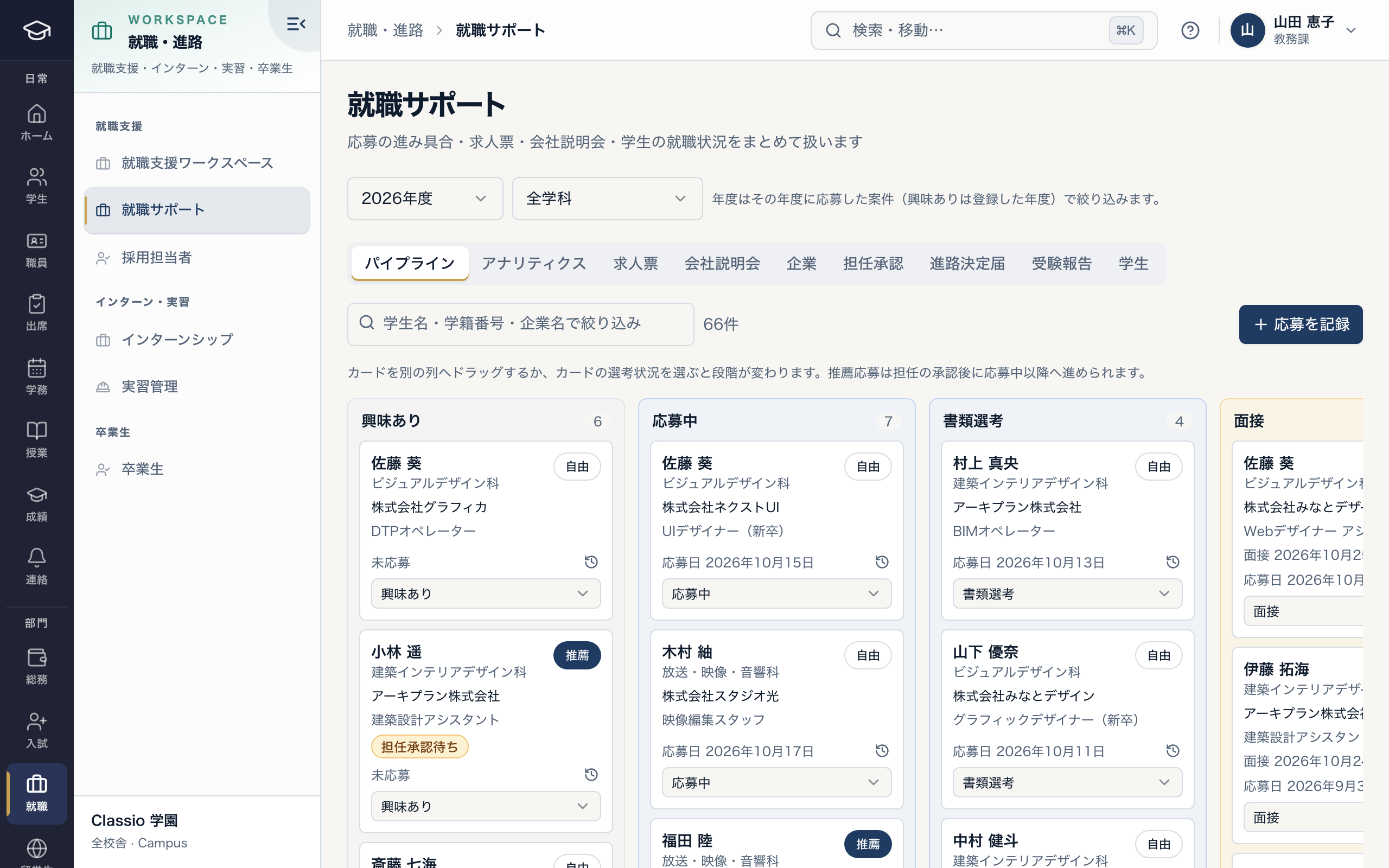
Application progress, stage by stage
- Recommended applications advance after homeroom approval
- Besides the pipeline: job listings, company sessions, homeroom approvals, destination reports
- Recommended and open applications told apart
Figures for preparing surveys and disclosures
The School Basic Survey is taken every year as of 1 May and covers vocational schools. Classio exports lists and counts from enrolment, attendance, grade and career records to prepare it.
Submitting, and deciding whether requirements of the higher-education support scheme or the vocational practice course are met, remain the school’s responsibility; Classio keeps the records you prepare them from.
Rules and Classio’s part in them
The main schemes for vocational schools, what Classio records or exports, and what the school decides.
1 Maycensus date
School Basic Survey (as of 1 May each year)
What Classio records or exports: Enrolment and destination records, lists for preparation
What the school decides or submits: Completing and submitting the survey
Higher-education support scheme
What Classio records or exports: Grade and attendance records, locked grades
What the school decides or submits: Institutional requirements and what to publish
Vocational practice course (職業実践専門課程)
What Classio records or exports: Placement, grade and career records
What the school decides or submits: Certification requirements and what to publish
Suspension from attendance (School Health and Safety Act)
What Classio records or exports: Suspension counted as excused absence, outside the rate
What the school decides or submits: Which absences are excused
Sources
Regulatory statements follow the scope of the cited documents. External documents do not certify Classio’s behaviour or compliance.
- MEXT: School Basic Survey, outline — survey date (1 May each year) and coverage including vocational schools
- MEXT: Higher Education Support Scheme — Outline and the FY2024 and FY2025 expansions
- MEXT: About the vocational practice course — purpose and certification
- School Health and Safety Act (e-Gov) — Article 19: suspension from attendance for infectious disease
Sources checked: October 18, 2026
Pricing for vocational schools
Records such as attendance, grades, fees and certificates start at STARTER. Placements, careers, portfolios and admissions need STANDARD; international student management needs PROFESSIONAL.
Amounts are calculated from school size exactly as on the pricing page (monthly, excluding tax). Staff and guardian accounts are not charged per person.
| School size | Plan | Monthly (excl. tax) |
|---|---|---|
| 120 students, 1 campus (records) | STARTER | ¥21,800 |
| 180 students, 1 campus (with placements and careers) | STANDARD | ¥39,800 |
| 250 students, 2 campuses | STANDARD | ¥44,800 |
| 400 students, 3 campuses (with international students) | PROFESSIONAL | ¥78,800 |
- 120 students, 1 campus (records)
- STARTER¥21,800
- 180 students, 1 campus (with placements and careers)
- STANDARD¥39,800
- 250 students, 2 campuses
- STANDARD¥44,800
- 400 students, 3 campuses (with international students)
- PROFESSIONAL¥78,800
What Classio does not do
- School-corporation accounting and payroll (data export for accounting software is available)
- Submitting surveys and reports to public bodies
- Running admissions advertising
Frequently asked questions
- Can we move our Excel student list?
- Yes, with the Excel template (.xlsx, up to 500 rows). Rows missing details become provisional records you can complete later. You can also import a previous system’s export by mapping its columns.
- Can we start with part of Classio and keep our current academic system?
- Yes. Careers and messaging need only the student list, and residence-card and reporting deadlines for international students start from the list plus residence details. Attendance also needs classes and the timetable, and international students’ attendance rates are calculated from attendance taken in Classio. Import the list once from your current system’s export or Excel, then enter later admissions, leaves and withdrawals in Classio too. There is no automatic link to the current system, and re-importing a student does not update one already registered.
- Do the career office and academic affairs use the same screens?
- They see the same student record, but each role has its own pages and actions: the career office handles careers and alumni, academic affairs handles records, attendance and grades.
- Does it work for correspondence courses?
- Correspondence courses differ by school, so we confirm the conditions with you.
- Can we try the screens first?
- Yes: three minutes without registration, with a sample vocational school’s data.
Start from how you work today
Show us the academic and career ledgers you use today.
Tell us your student numbers, departments and the lists you keep, and we will suggest what to start with and how to move it.