Nursery and kindergarten
From drop-off to nap time, lunch and pick-up: one record of the day.
Check staffing ratios now, keep nap checks on time, confirm allergy meals with a second person, and run daily notes, extended care and childcare fees — priced per nursery.
Lines this school uses
- Record in the notification centre
- App or browser push
- Send by LINE
- Switch to email
- Keep the delivery log
- Create bills
- Remind before and after the due date
- Pay
- Record the payment
- Approve waivers and refunds
- Follow up and export journals
- Clock in, request leave
- List what needs cover
- Approve leave, assign cover
- Submit the month
- Approve
- Lock and build the payroll file
- CSV for payroll software
What Classio is for nurseries and kindergartens
For nurseries, kindergartens and centres for early childhood education and care, Classio records drop-off and pick-up with staffing ratios, nap checks, food allergies with a second-person check at meals, near misses and accidents, daily journals and care plans, child records and year-end records, daily notes, and extended care with childcare fees, from one nursery up. It does not prepare subsidy or allowance claims.
Last updated: October 26, 2026
A nursery’s day with Classio
An example day. Each item links to the section that explains it.
Any timeStaffing ratio checked now
12:30Nap checks
Any timeNear misses recorded
18:00+Extended care recorded
Month endChildcare fees billed
Drop-off, pick-up and the staffing ratio right now
Drop-off and pick-up times are recorded for each child. The Today view of the nursery records counts the children present by class age and shows the staff needed beside the staff assigned, and how many more are needed when there are too few.
The defaults follow Article 33 of the Standards for the Equipment and Operation of Child Welfare Facilities: one staff member per 3 children aged 0, 6 aged 1–2, 15 aged 3 and 25 aged 4–5, and at least two per nursery. A nursery using a transitional measure or other figures can change them.
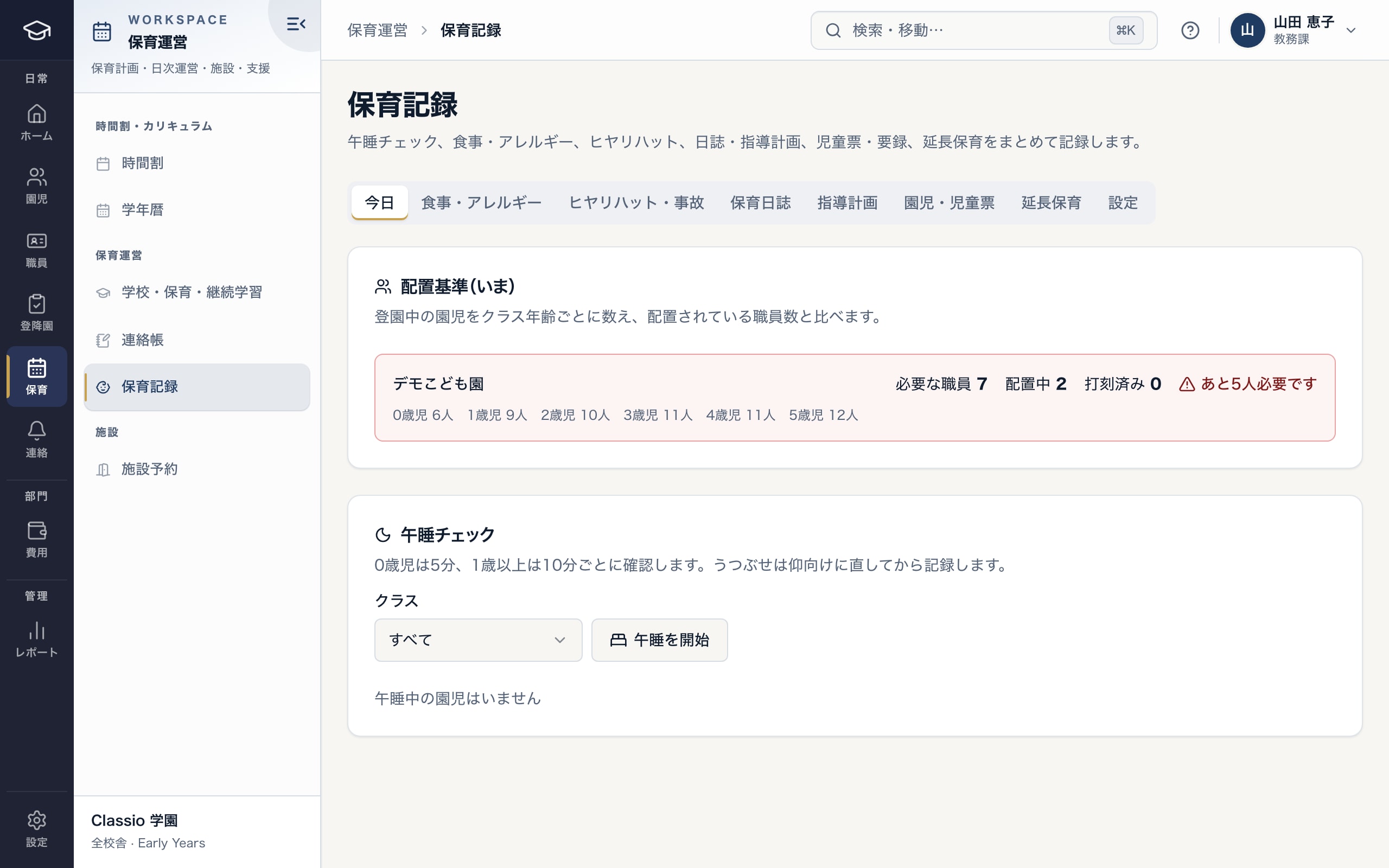
Check the staff needed right now from the children present and the staff assigned
- Staff needed beside staff assigned, and how many more when short
- Children present, counted by class age
- Nap-check intervals by class age (adjustable per nursery)
Nap checks at intervals by class age
When a nap starts, checks are recorded at intervals by class age: 5 minutes for age 0 and 10 minutes from age 1 by default, adjustable to local guidance. Overdue checks turn red.
A child lying face down can only be recorded together with being turned onto their back. A face-down position or a breathing concern notifies the head and deputy head and stays on record.
Food allergies and lunch, confirmed by two people
For each child, record the allergen (the 9 mandatory and 20 recommended allergens of Japan’s food allergy labelling, or other), severity, removal, substitute or observation, whether an EpiPen® is carried, and the date of the doctor’s allergy management form. Only the head or deputy head can remove an entry.
Once a menu lists each meal’s allergens, the children who need a different meal appear. A removal or substitute meal cannot be recorded without a second, different staff member named as the checker.
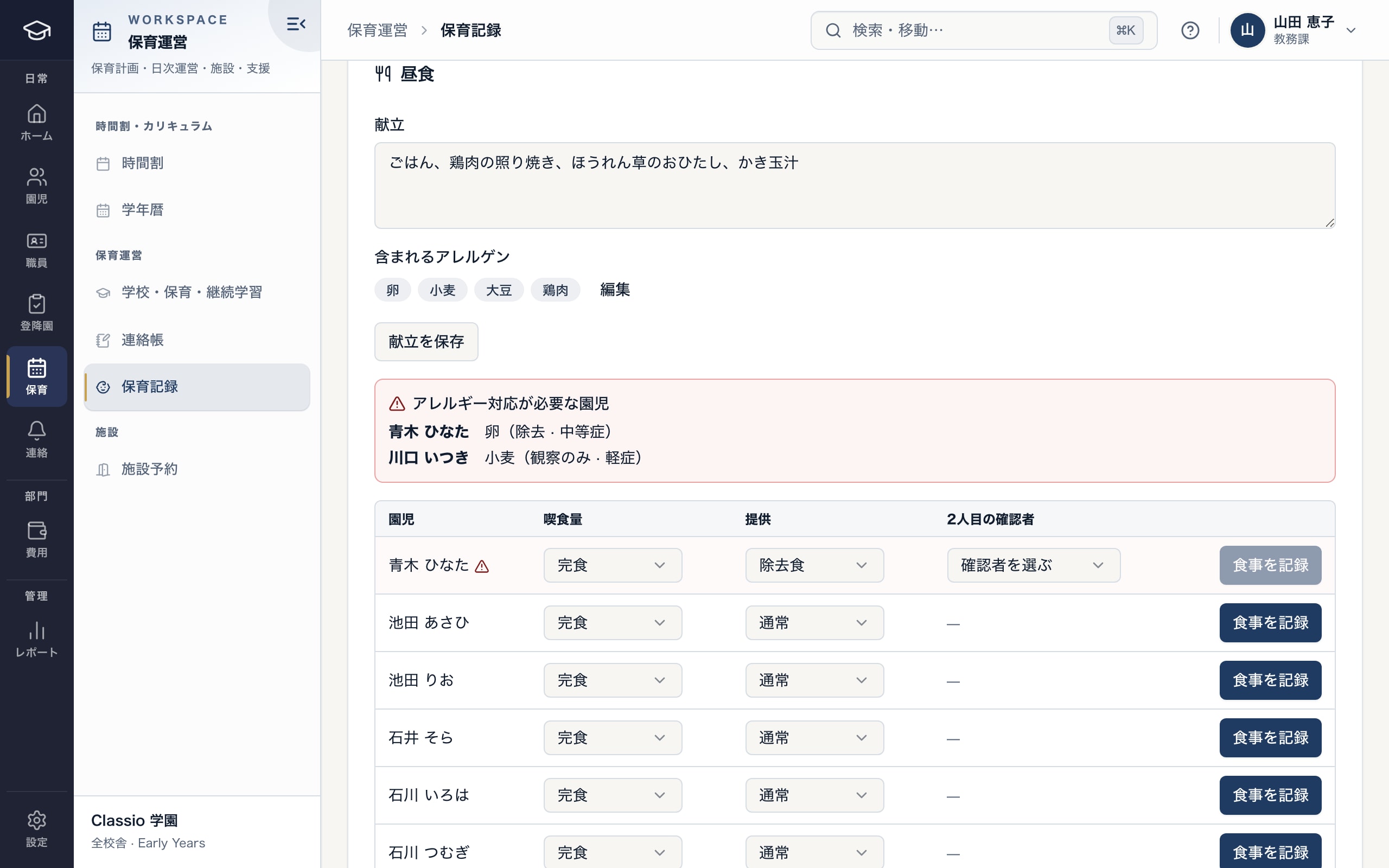
Match menu allergens to children’s allergies, and confirm removal meals with two people
- Allergens in each menu
- Children who need a different meal, with removal or observation and severity
- A removal or substitute meal needs a second, different staff member
Near misses and accidents
Near misses and accidents start as drafts; submitting notifies the head and deputy head. A report marked as a serious accident is delivered at once, even during quiet hours.
For a serious accident Classio shows the deadlines for the first report to the municipality (in principle the same day, at the latest the next day) and the second (in principle within about a month) and records when each was sent. The nursery files the reports itself.
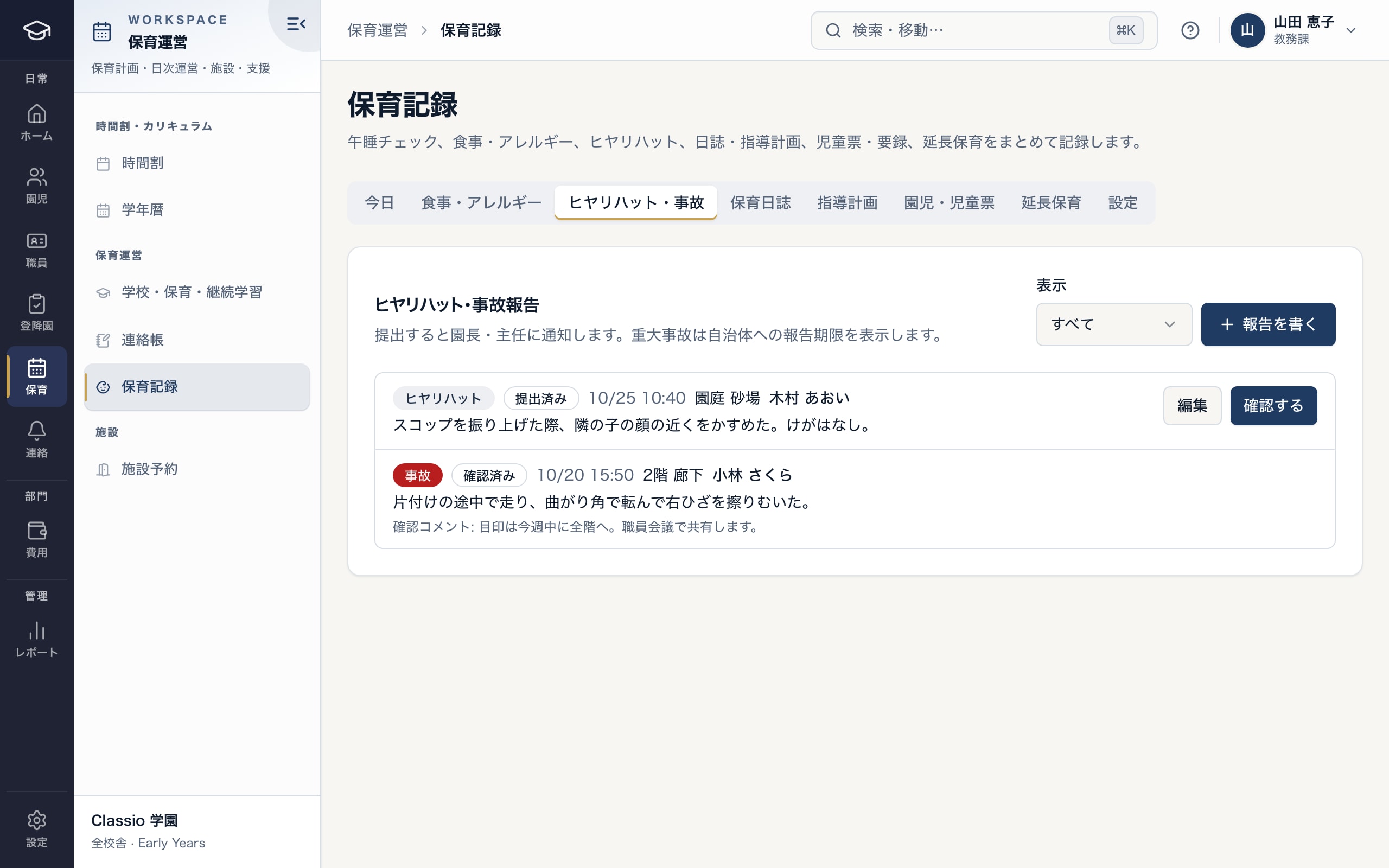
Record near misses and accidents; the head and lead teacher review them
- Type, time, place, child and what happened
- Submitted reports are reviewed by the head and lead teacher
- The reviewer’s comment stays on the report
Daily journals, care plans, child records and year-end records
A daily journal is one per class per day, written beside that day’s attendance; submitting sends it to the head or deputy head to approve or return. Care plans are yearly, termly, monthly or weekly, with individual plans for ages 0–2; once approved, only the evaluation can be added.
Child records hold family circumstances, medical history, immunisations and development by age, and open only to the head, deputy head and this year’s class teachers. Year-end records follow the sections of the nursery, kindergarten and centre forms and print on A4.
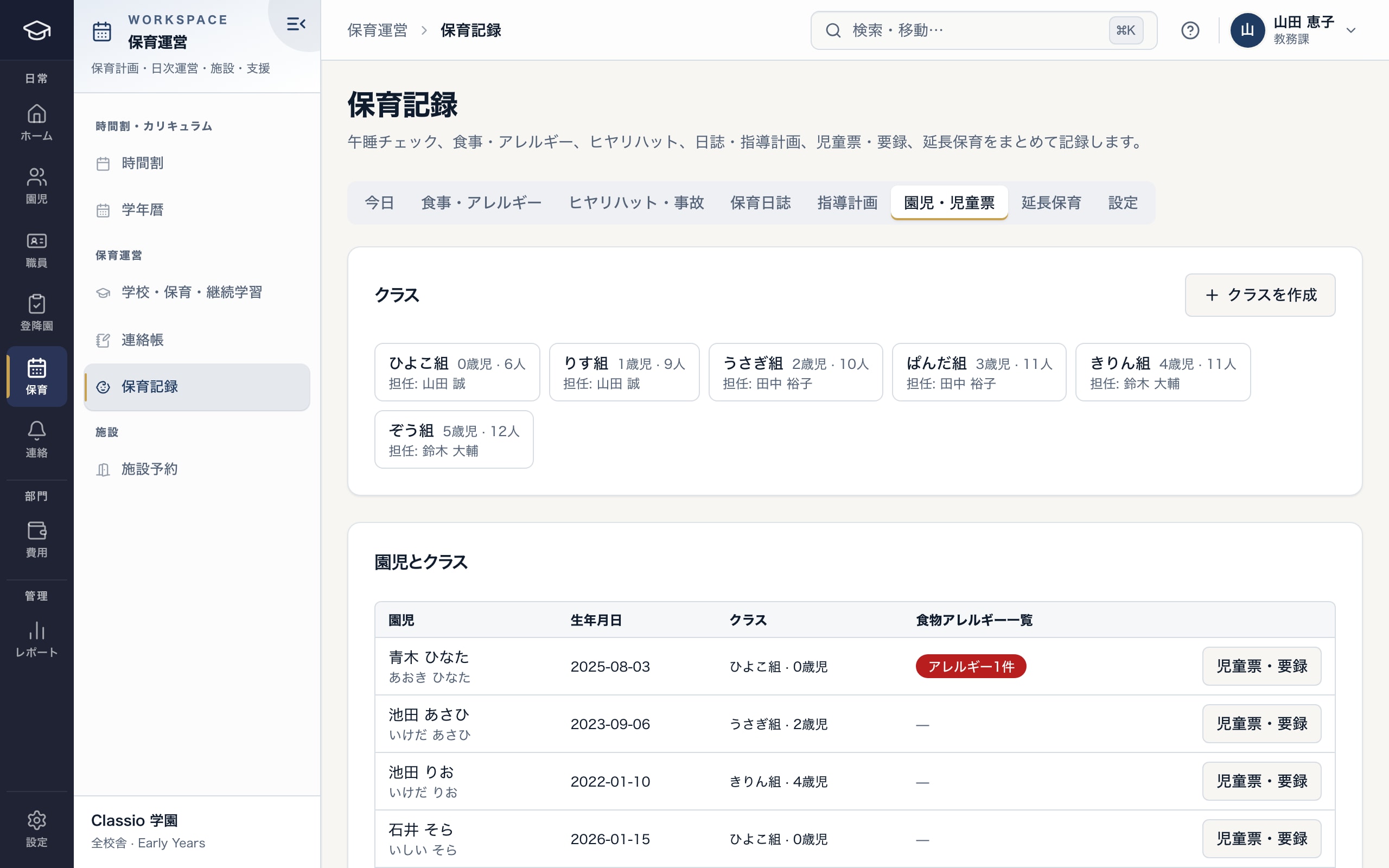
Classes and teachers, and each child’s record and year-end record
- Each class’s age, size and teachers
- Whether a child has allergies on record
- Child and year-end records (head, deputy head and class teachers only)
Daily notes and families
Staff write a note on each child’s day, with photos, and publish it. Guardians read and reply in the phone browser or the Classio app.
Guardians also see that day’s meals (including removal or substitute meals), nap times and the allergies on record, for their own children only. Notices go first by app or browser push, then LINE, then email if nothing else arrived.
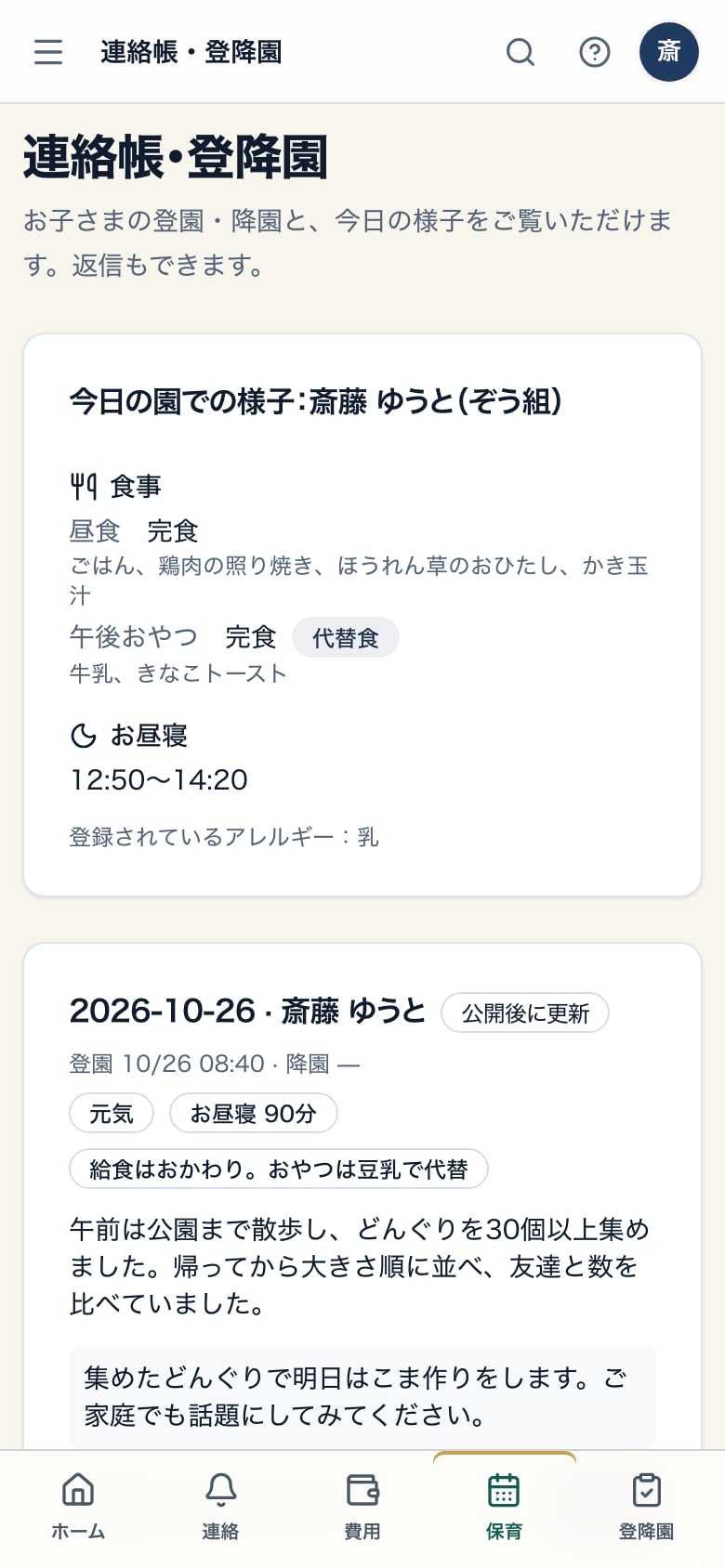
Guardians see today’s meals, nap, allergies and daily note — for their own child only
- Substitute and removal meals appear with the day’s meals
- Nap times
- Today’s daily note, published by staff; guardians can reply
Extended care and childcare fees
Extended care is charged from drop-off and pick-up times and the nursery’s standard hours, unit length, grace minutes and unit fee (¥0 by default). Charges confirmed by an administrator or finance are never recalculated.
Each month’s confirmed charges become one bill per child, and the payer is notified when it is issued. Card and konbini payments are offered after the nursery opens its own Stripe account and target-environment checks are done; staff can also record payments.
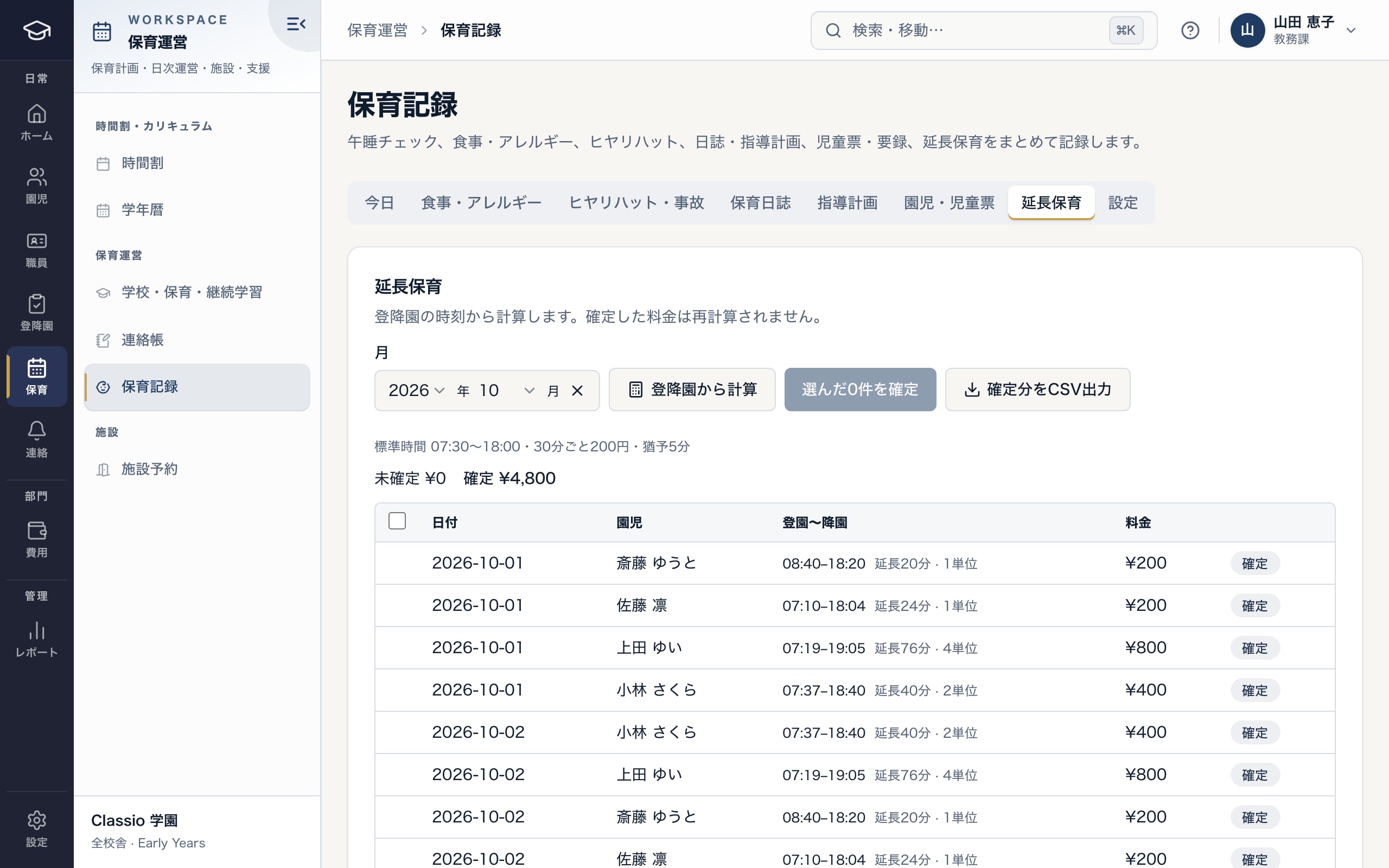
Calculate and confirm extended-care charges from drop-off and pick-up times
- The nursery’s standard hours, unit, grace and fee
- Extra time and units from drop-off and pick-up
- Confirmed charges are never recalculated and export as CSV
Main childcare rules and Classio’s part
The main rules, what Classio records and shows, and what the nursery decides and files.
Art. 33
Staffing (Standards for Child Welfare Facilities, Article 33)
What Classio records and shows: Counts children present by class age and shows staff needed beside staff assigned
What the nursery decides and files: Whether a transitional measure applies, settings that match local standards, and actual staffing
Accident reporting (notice on reporting accidents in education and childcare facilities)
What Classio records and shows: Shows first and second report deadlines for serious accidents and records when they were sent
What the nursery decides and files: Reporting to the municipality (Classio does not file)
2people check
Food allergies (allergy guideline for nursery schools; food allergy labelling)
Removed or substitute meals
What Classio records and shows: Records the management form date, allergens, removal or substitute and EpiPen®, and requires a second checker for allergy meals
What the nursery decides and files: The response a doctor’s instructions call for
Watching children during naps (accident prevention guidelines)
What Classio records and shows: Records checks at intervals by class age and shows overdue checks in red
What the nursery decides and files: The interval, and the watching itself
Year-end records (nursery, kindergarten and centre forms)
What Classio records and shows: Section-by-section entry, printed on A4 under the national forms’ headings
What the nursery decides and files: Matching the municipality’s form and sending it to the elementary school
Sources
Rules are described within the scope of the cited sources. External sources do not certify how Classio works or that it complies with any law.
- Standards for the Equipment and Operation of Child Welfare Facilities (e-Gov law search, checked 26 October 2026)
- Children and Families Agency — guidelines on preventing and responding to accidents in education and childcare facilities (checked 26 October 2026)
- Children and Families Agency — notice on reporting accidents in education and childcare facilities (checked 26 October 2026)
- Children and Families Agency — allergy guideline for nursery schools (2019 revision) (checked 26 October 2026)
- Consumer Affairs Agency — food allergy labelling (checked 26 October 2026)
Sources checked: October 18, 2026
Nursery pricing at typical sizes
Priced per nursery on the same price list as cram and lesson schools: Light includes 80 children per nursery and Standard 200, with a per-child amount beyond that. Each extra nursery adds its own price and allowance.
Nursery records, drop-off and pick-up, daily notes and childcare fees are in Light; Standard adds staff shifts and timekeeping and head-office features for several nurseries. Amounts use the same calculation as the price list (monthly, excl. tax). Staff and guardian accounts are not charged per person.
| Nursery size | Plan | Monthly (excl. tax) |
|---|---|---|
| 1 nursery, 60 children | Light | ¥7,800 |
| 1 nursery, 100 children | Light | ¥8,800 |
| 2 nurseries, 150 children | Light | ¥14,600 |
| 1 nursery, 120 children | Standard | ¥14,800 |
- 1 nursery, 60 children
- Light¥7,800
- 1 nursery, 100 children
- Light¥8,800
- 2 nurseries, 150 children
- Light¥14,600
- 1 nursery, 120 children
- Standard¥14,800
What Classio does not do
- It does not prepare allowance, facility benefit or subsidy claims.
- It does not connect to nap sensors; staff record the checks.
- Year-end records print under the national forms’ headings; check with your municipality whether its own form is required.
- It does not calculate staff pay.
Frequently asked questions
- Can unlicensed or workplace-led nurseries use it?
- Yes. Defaults such as staffing figures and nap-check intervals can be changed per nursery.
- Does it prepare allowance or benefit paperwork?
- No. Classio handles daily records and childcare fees; allowance, facility benefit and subsidy claims are out of scope.
- Can the nursery set extended-care fees?
- The nursery sets standard hours, unit length, grace minutes and the unit fee. The unit fee starts at ¥0, and confirmed charges are never recalculated.
- Does the price depend on the number of children?
- It is per nursery per month: Light includes 80 children and Standard 200, with a per-child amount beyond that, as in the examples above.
Start from how you work today
Try a nursery’s day in the demo.
No registration: three minutes with a sample nursery’s staffing ratios, lunch allergy checks and extended care. Tell us how you keep records and bill fees today, and we will suggest how to start.