Cram and lesson schools
A classroom’s day — arrivals, lesson reports, make-ups and monthly fees — in one place.
Tell guardians when a child arrives, write the report after class, book a make-up when an absence comes in and bill the month’s fees — every day, from a single classroom.
Lines this school uses
- Record in the notification centre
- App or browser push
- Send by LINE
- Switch to email
- Keep the delivery log
- Create bills
- Remind before and after the due date
- Pay
- Record the payment
- Approve waivers and refunds
- Follow up and export journals
What Classio is for cram and lesson schools
For cram schools and lesson schools, Classio records arrivals and departures with guardian notices, lesson reports, absence notices and make-up bookings, monthly fees with arrears follow-up, and school-bus alerts, from one classroom up. Notices go first by app or browser push.
Last updated: October 26, 2026
A classroom’s day with Classio
An example afternoon. Each item links to the section that explains it.
After startNot-arrived alert
After classLesson report to guardians
19:10Departure recorded
Bus runStop-by-stop arrival notices
Month endMonthly fees and arrears follow-up
Record arrivals and tell guardians
Today’s classroom lists each lesson’s students: press Arrive when they come and Leave when they go. Guardians see arrivals and departures on their home screen.
The not-arrived alert lets the classroom choose how many minutes after the start to notify. It tells the guardian and teacher once for students with no arrival, and waits past the expected time for students reported late.
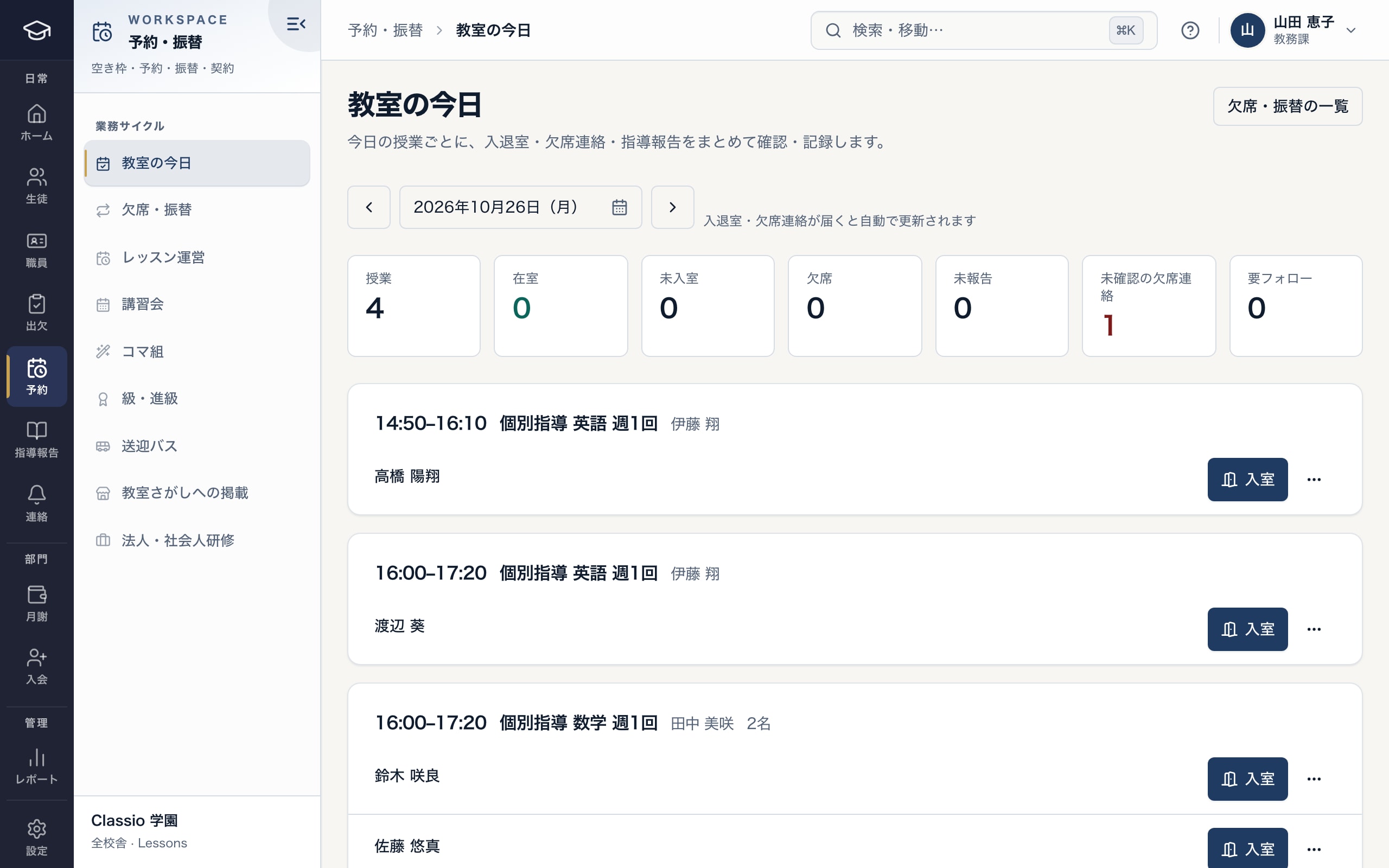
Check-in and check-out, absence notices and lesson reports for each lesson on one screen
- In the room, not arrived, absent, unreported and unconfirmed notices
- Press Check in when the student arrives
- To the absence and make-up list
Lesson reports after class
After the lesson press Lesson report and enter understanding, last homework, what was covered, today’s homework and the next goal; tap stock phrases to add them.
Send to guardians sends it — or, where the classroom requires review, it arrives after the classroom manager checks it. Guardians read and reply at home.
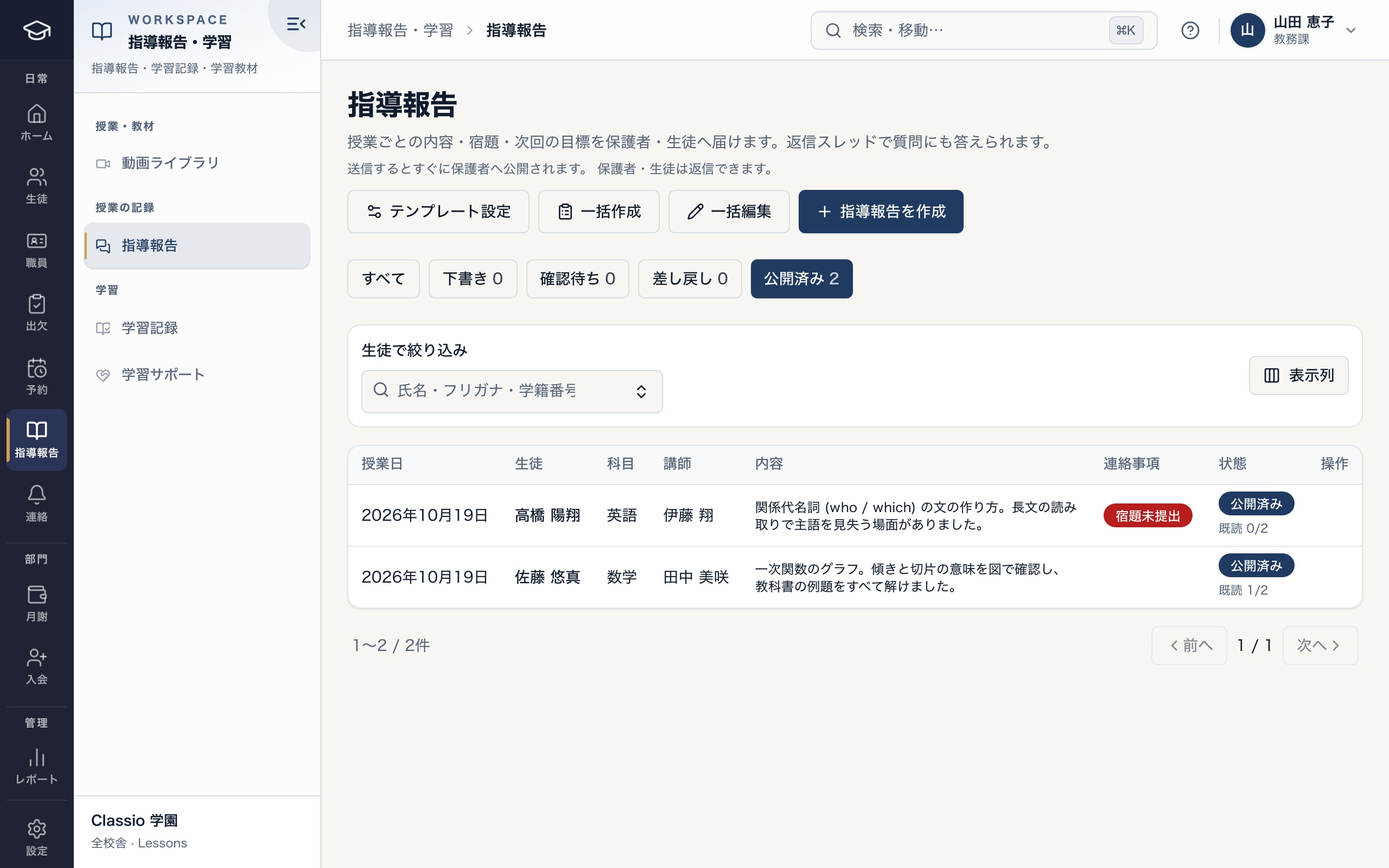
A report for each lesson, and whether guardians have read it
- Report template and batch creation
- Flags such as homework not handed in
- Published, and how many have read it
From absence notice to make-up booking, by the classroom’s rules
Guardians and students report an absence in Bookings and make-ups and, where eligible, book a free slot. Sending “off tomorrow” to the classroom’s LINE account also works.
Each course sets the notice deadline, make-up period, monthly and term limits and where make-ups can be booked. Late notices are accepted as absences but lose the make-up. The classroom confirms, books on a family’s behalf or extends deadlines in Absences and make-ups, with reasons recorded.
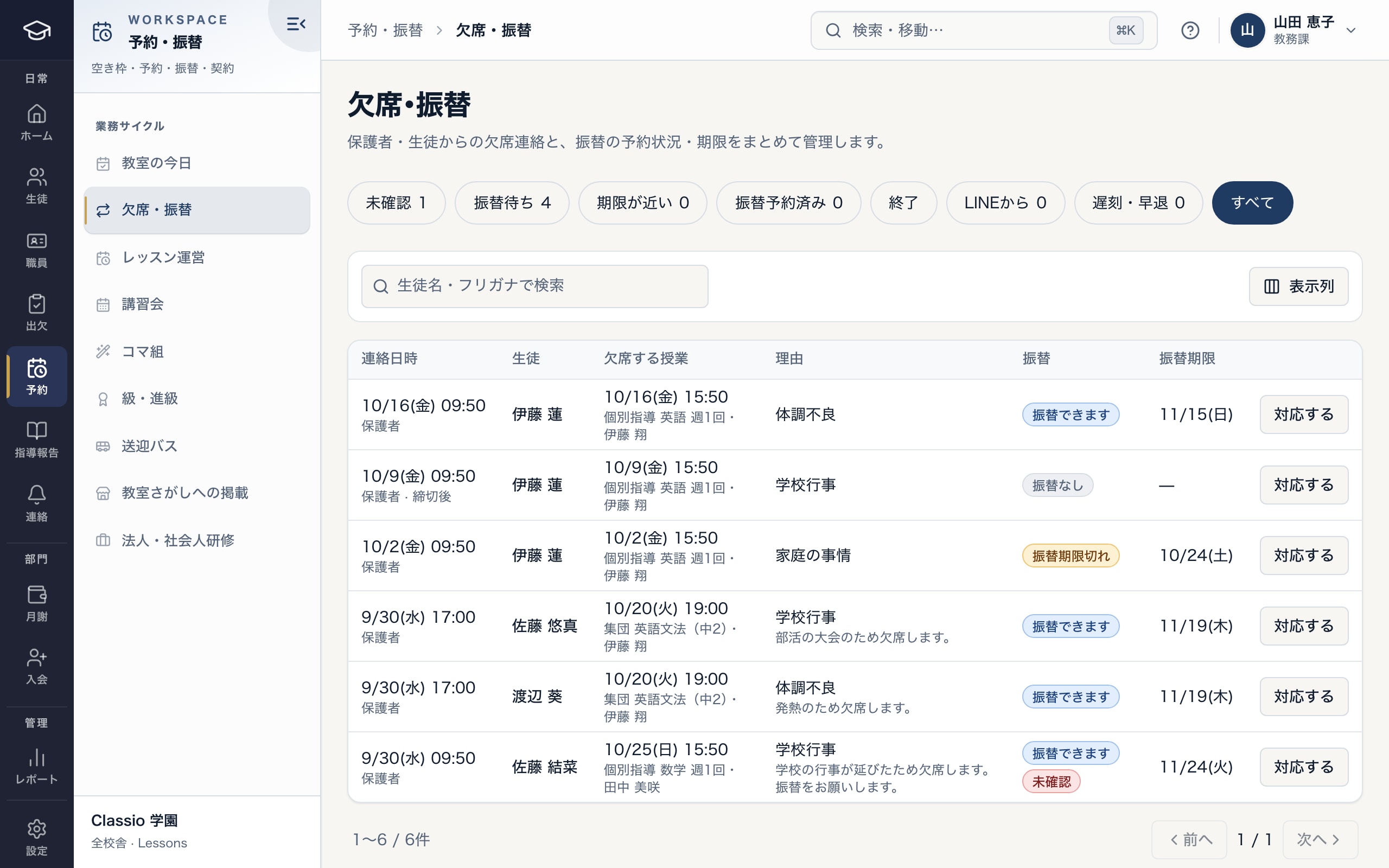
For each absence notice, whether a make-up is allowed and by when
- Filter by unconfirmed, awaiting make-up, deadline near, from LINE and more
- Whether a make-up is allowed
- Make-up deadline
Monthly fees and arrears follow-up
Monthly fees are built from lesson agreements and can be checked and edited before billing. Guardians get reminders around the due date, and families using another language get a standard translation with the same amount and date.
Unpaid follow-up shows each family’s status, with demand notices, contact notes and drafted messages. Card payment is offered after each classroom opens its own Stripe account and target-environment checks are done; direct debit after a contract with a collection agent.
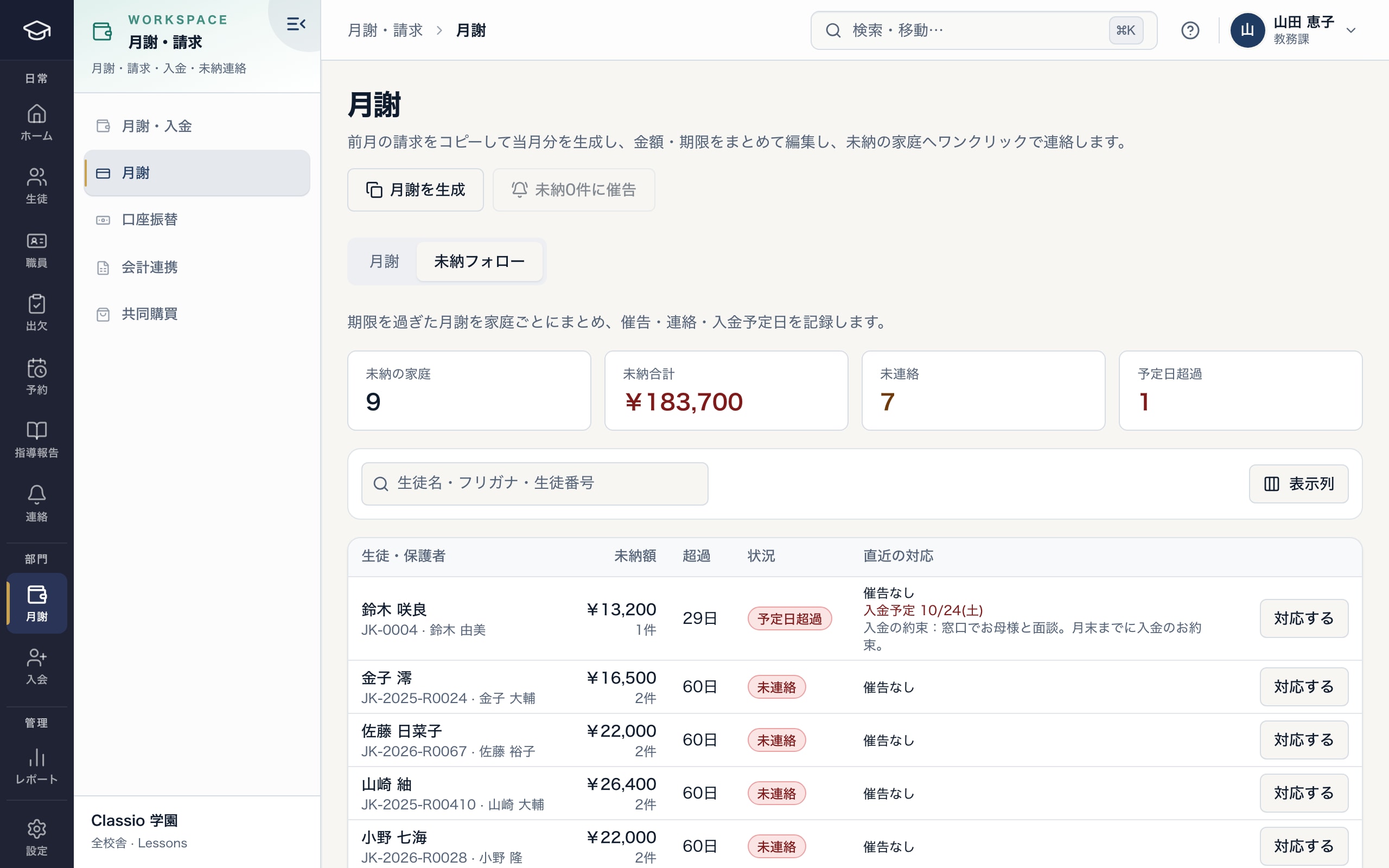
Overdue fees grouped by family, with demand notices, contact and promised payment dates
- Copy last month’s bills to create this month’s
- Families in arrears, total, not contacted, past promised date
- Demand notices, contact notes and promised payment dates
School bus and the school directory
Register routes, stops and riders, and as the driver records the run, only the guardians at each stop get departed, arriving soon and arrived. Guardians see no map and bus positions are not stored. Ending a run requires confirming no one is left on board.
Classrooms on Classio can list themselves free in the directory for families (classio.jp/schools) and take trial-lesson requests, with no fee per request.
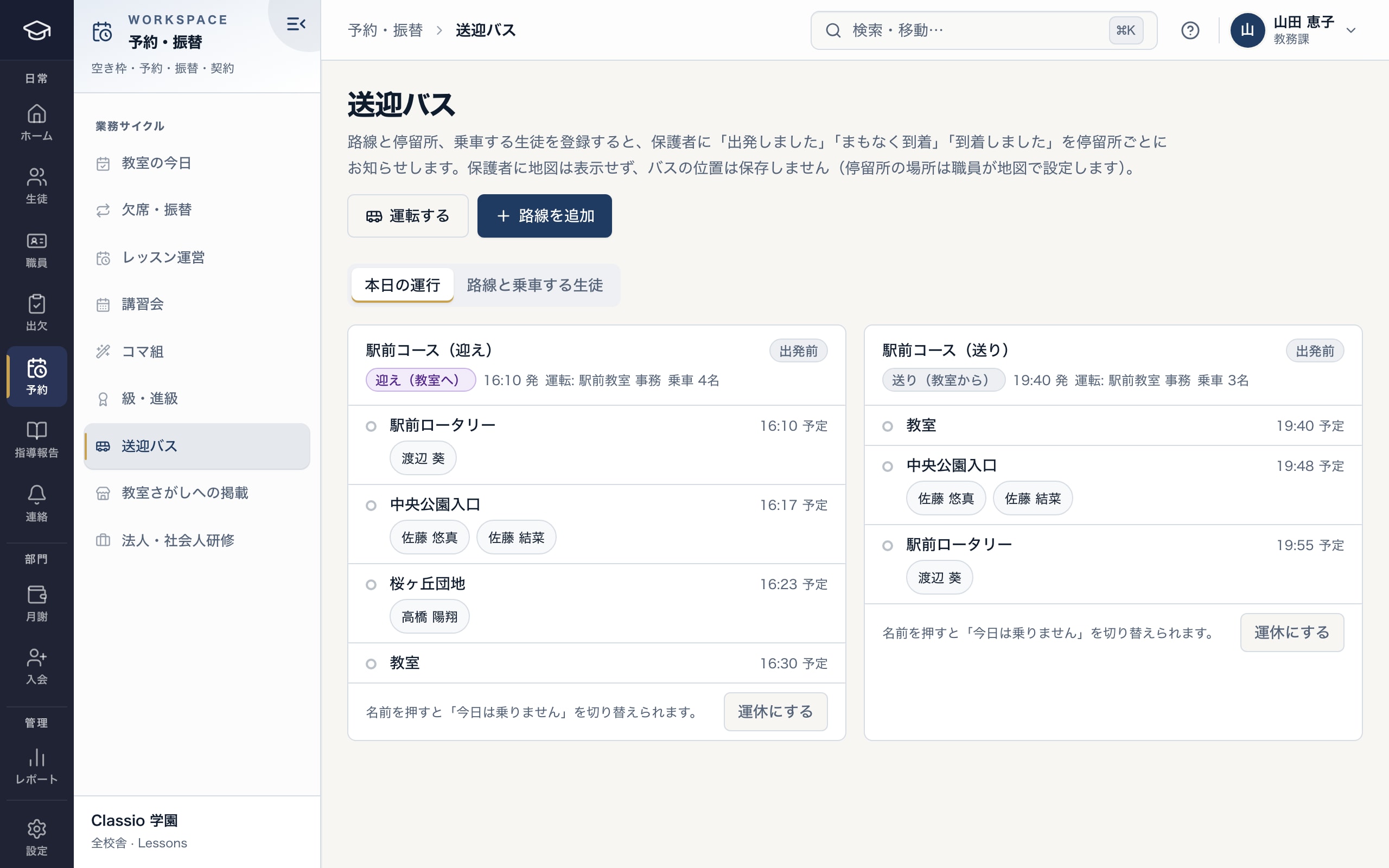
Check each run’s stops and riders, then start driving
- The driver starts the run and records each stop
- Expected time and riders at each stop
- Guardians get departed, arriving soon and arrived for their stop
What messaging costs
Guardian notices go first by app or browser push, then LINE, then email. When push arrives, LINE is skipped, which keeps LINE sends down.
Cost by channel
| Channel | Cost |
|---|---|
| App and browser push | Included in Classio’s price |
| LINE | Paid by the classroom to LY Corporation under its LINE Official Account plan |
| Included in Classio’s price |
LINE plans change from time to time; check LY Corporation’s page in the sources.
Head office and several classrooms
With several classrooms, head office sees each classroom’s enrolment, new joiners, leavers, unpaid rate and attendance side by side. Each classroom’s records stay separate and are never merged.
Franchise royalties are supported up to the statement; Classio does not collect them.
Checking LINE costs
If you message families by LINE, check LY Corporation’s plans for the cost.
Sources
Regulatory statements follow the scope of the cited documents. External documents do not certify Classio’s behaviour or compliance.
Sources checked: October 18, 2026
Cram and lesson school pricing at typical sizes
Priced per classroom: Light includes 80 students per classroom and Standard 200, with a per-student amount beyond that. Each extra classroom adds its own price and student allowance.
Amounts use the same calculation as the price list (monthly, excl. tax). Staff and guardian accounts are not charged per person.
| School size | Plan | Monthly (excl. tax) |
|---|---|---|
| 1 classroom, 80 students | Light | ¥7,800 |
| 1 classroom, 120 students | Light | ¥9,800 |
| 2 classrooms, 140 students | Light | ¥14,600 |
| 1 classroom, 200 students | Standard | ¥14,800 |
- 1 classroom, 80 students
- Light¥7,800
- 1 classroom, 120 students
- Light¥9,800
- 2 classrooms, 140 students
- Light¥14,600
- 1 classroom, 200 students
- Standard¥14,800
What Classio does not do
- Selling teaching materials and advertising for students are not covered.
- Teacher payroll is not calculated.
- The bus check does not replace the legally required left-behind prevention devices.
Frequently asked questions
- What if we have more than 80 students?
- On Light, a per-student amount applies from the 81st, as in the 120-student example above.
- Do you support direct debit?
- After a contract with a collection agent. Classio never stores bank account numbers.
- Can we move from Excel or another system?
- Yes: student rosters and opening balances can be imported.
- Can families book trial lessons?
- List the classroom free in the school directory and families can request a trial from its page, with no fee per request.
Start from how you work today
Try a classroom’s day in the demo.
No registration: three minutes with sample data in Today’s classroom, absences and make-ups and lesson reports. Tell us how you contact families and bill today and we will suggest how to start.