Grades and credits
Enter, approve and lock grades. Confirmed grades feed certificates and reports.
Enter scores by class or CSV, submit for review, approve and lock, handle appeals after locking, grade bands and GPA. Only confirmed grades are used for transcripts and reports.
How grades are confirmed
G01 Enter and save scores
Teacher
Grid or CSV
G02 Calculate final mark and grade
Classio
With the school’s weights and bands
G03 Submit for review
Teacher
No edits after submitting
G04 Approve or return
Administrators
The submitter cannot approve
G05 Lock
Administrators
Students are notified
G06 Ask for a review
Student
Appeal against a locked grade
Who acts, in what order. The “Classio” row is what the system does by itself.
Grades in Classio
Grade management means checking teachers’ marks against the school’s rules, confirming them and turning them into records fit for certificates and progression decisions. In Classio, teacher entry, approval by administrators, locking and appeals after locking are tracked per class, and only locked grades are used for transcripts and reports.
Last updated: October 26, 2026
Enter scores in the class grid
Teachers choose a class in Grade entry and type each student’s score for each assessment. The formula and grade bands are shown above the grid, and the final mark and grade are calculated from the scores.
Only students with every assessment filled in are saved. Blank students do not become zero, and a partly filled student stops the save and is highlighted. CSV import shows a preview so errors are fixed before importing.
Administrators set the assessments and weights in the school’s grading scheme; the weights add up to 100%.
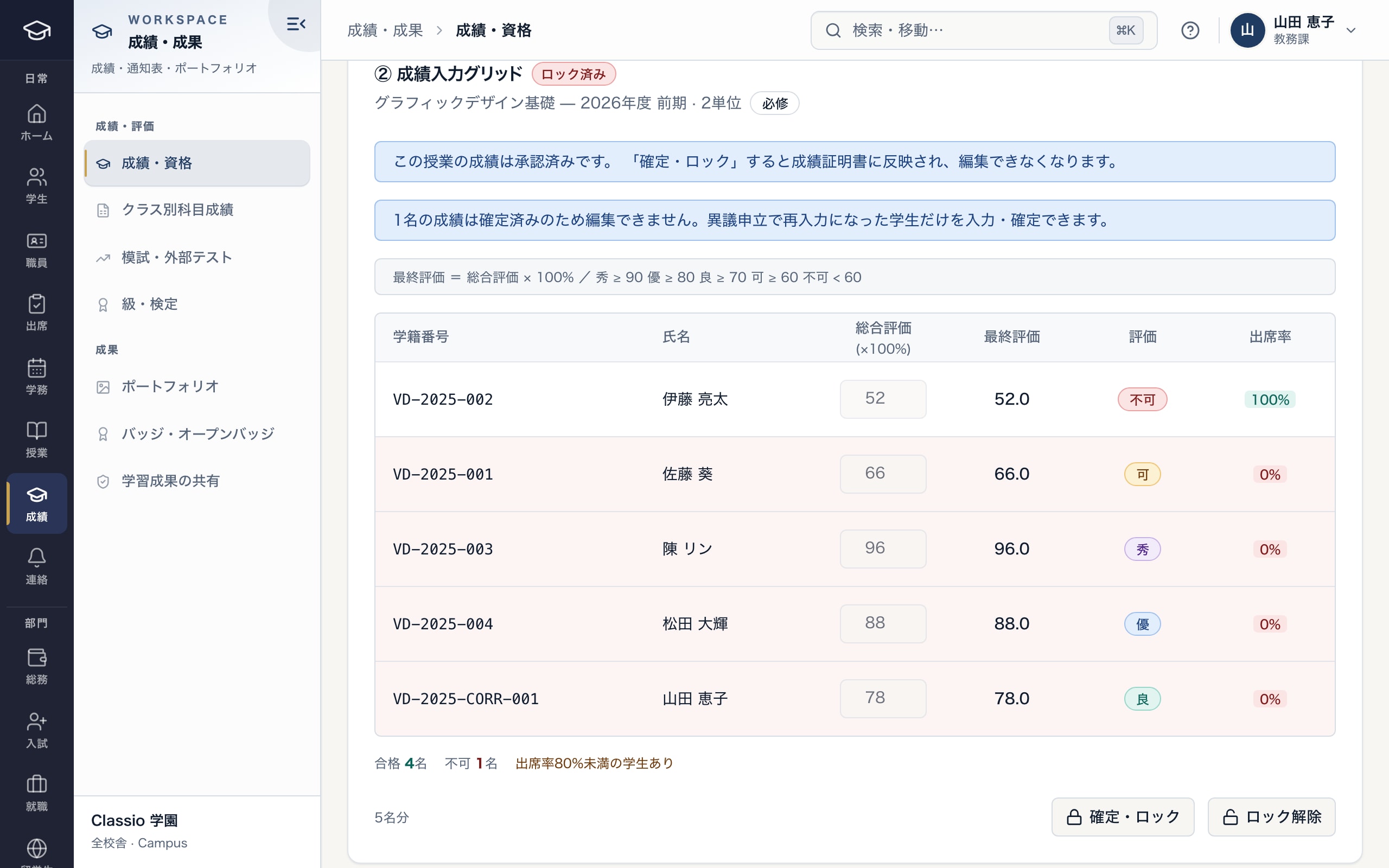
Checking approved grades before locking them
- Approved; locking sends them to transcripts
- Final-mark formula and grade bands
- Final mark and grade calculated from the scores
- Lock after approval
Submit, approve and lock
When entry is finished the teacher presses Submit for review; the grades cannot be edited until they are approved or returned. Administrators check them and approve, or return them with a reason. The person who submitted cannot approve.
When every grade in the class is approved, press Lock. Students are notified that their grades are recorded. To change a locked grade an administrator unlocks it first. Schools that do not use approval can lock saved grades directly.
Appeals against locked grades
Students can press Ask for a review on any locked grade and give a reason. Administrators reply and approve or reject; an appeal they raised themselves goes to someone else.
Approval reopens only that student’s grade; the rest of the class stays locked. The teacher corrects the score and resubmits, and after approval and locking the student is notified.
Only locked grades go to certificates and reports
A transcript can be issued only when approved, locked grades exist. The Grades report counts averages, GPA, pass rate and grade distribution from locked grades only; unlocked grades are left out and their number is shown.
GPA is calculated where the school’s grading rules map grades to GPA points. Students whose grades have no mapping are counted but left out of GPA, with a notice.
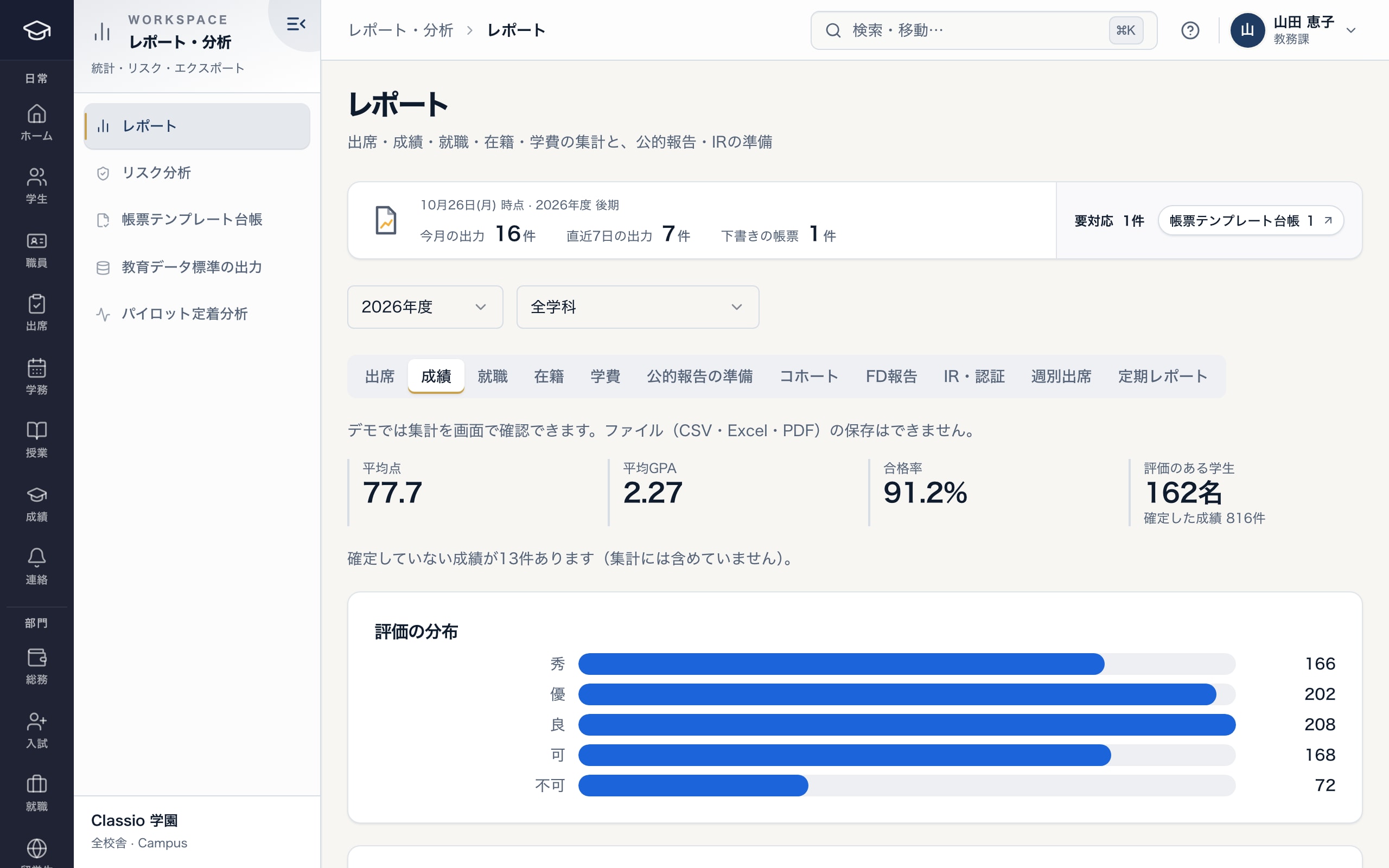
Grade reports counted from locked grades only
- Averages, GPA and pass rate use locked grades only
- Unlocked grades are left out, and counted
- Distribution of grades
Awkward cases
- Entry is not finished by the deadline
- Partly entered students stop the save and are highlighted; blank students never become zero.
- The approver is away
- Submitters cannot approve their own grades, so name more than one approver.
- A marking error is found after locking
- Fix it through the student’s appeal or an administrator’s unlock; an appeal reopens only that student’s grade.
- Resits and make-up exams
- As with an appeal, reopen only that student’s grade and approve and lock it again.
Differences by kind of school
- Vocational schoolsSubject grades feed qualification records and progression decisions.Vocational schools
- Universities and junior collegesGPA and credits feed the degree audit.Universities
- Private K–12Criterion-based evaluation and comments feed report cards and cumulative records.Private K–12
- Cram and lesson schoolsFamilies hear through lesson reports rather than confirmed grades.Cram and lesson schools
Which plans include it
Grade entry, approval, locking and appeals are included from STARTER for vocational schools, Japanese-language schools and universities, and in the private K–12 price.
See pricingWhat it does not do
- The school decides grading criteria and weights, and progression and graduation.
- Grades not mapped in the grading rules are left out of GPA.
- Locked grades change only after an administrator unlocks them or an appeal is approved.
Start from how you work today
See the grade screens in the demo.
No registration: three minutes with sample data in grade entry and the grade report. Tell us how grades are confirmed today and we will suggest how to start.