Japanese-language schools
Attendance rates and residence deadlines at Japanese-language schools, from everyday records.
Attendance is the basis of enrolment management, residence deadlines differ for every student, and staff changes need a clean handover. Classio connects daily attendance to deadline reminders and the lists you prepare reports from.
Lines this school uses
- Register the residence card and passport
- Remind 90, 60 and 30 days ahead
- Apply for renewal
- Record the application date
- Record weekly work hours
- Produce lists and letters
- Take attendance
- Report an absence
- Review approved absences
- Count the rate, raise alerts
- Assign and follow up
- Check the record
What Classio is for Japanese-language schools
A school management system that keeps attendance rates, residence-card deadlines and renewals, permitted work hours, support cases and letters to students on one record per student.
Last updated: October 26, 2026
The Japanese-language school year, and its deadlines
Common dates and procedures. The school carries out the procedures; Classio keeps the records and lists you prepare them with.
April / OctoberIntake and residence-card registration
1 May / 1 NovemberAcceptance-status notification (Immigration Services Agency)
Per studentReminders 90, 60 and 30 days before expiry
WeeklyPermitted work hours
Any timeInterviews and support cases
CompletionDestinations and withdrawal letters
Watching attendance daily and acting before it falls
Rates are counted from lesson records against the school’s approved threshold. Excused absences are left out of the denominator, and a student with no records yet shows “—”.
Students whose six-month rate is below the threshold, or whose residence card expires soon, can be followed as support cases with an owner, a due date and a priority. Cases are never sent to the student.
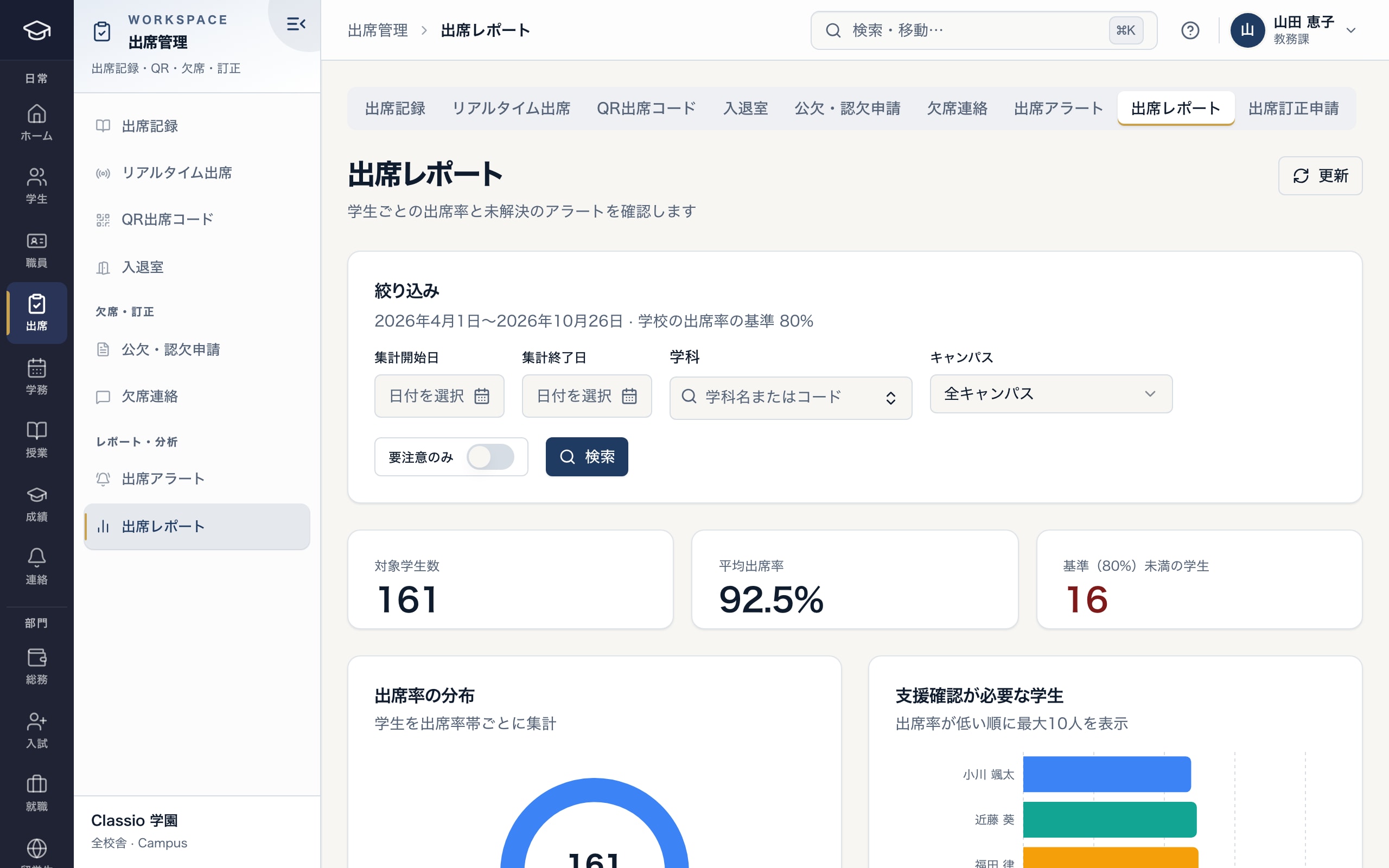
Rates by student and who is below the threshold
- Period and the school’s threshold
- Students below the threshold
- Students who need follow-up, lowest rate first
Residence-card deadlines and pending renewals
Each card’s status is worked out from its expiry date every day: expiring, expired or renewal pending. When a student applies for renewal, record the date; the estimated special period is shown too.
Every morning at 9:00 (Japan time), students (in Japanese and English) and staff are reminded about residence cards and passports 90, 60 and 30 days before expiry.
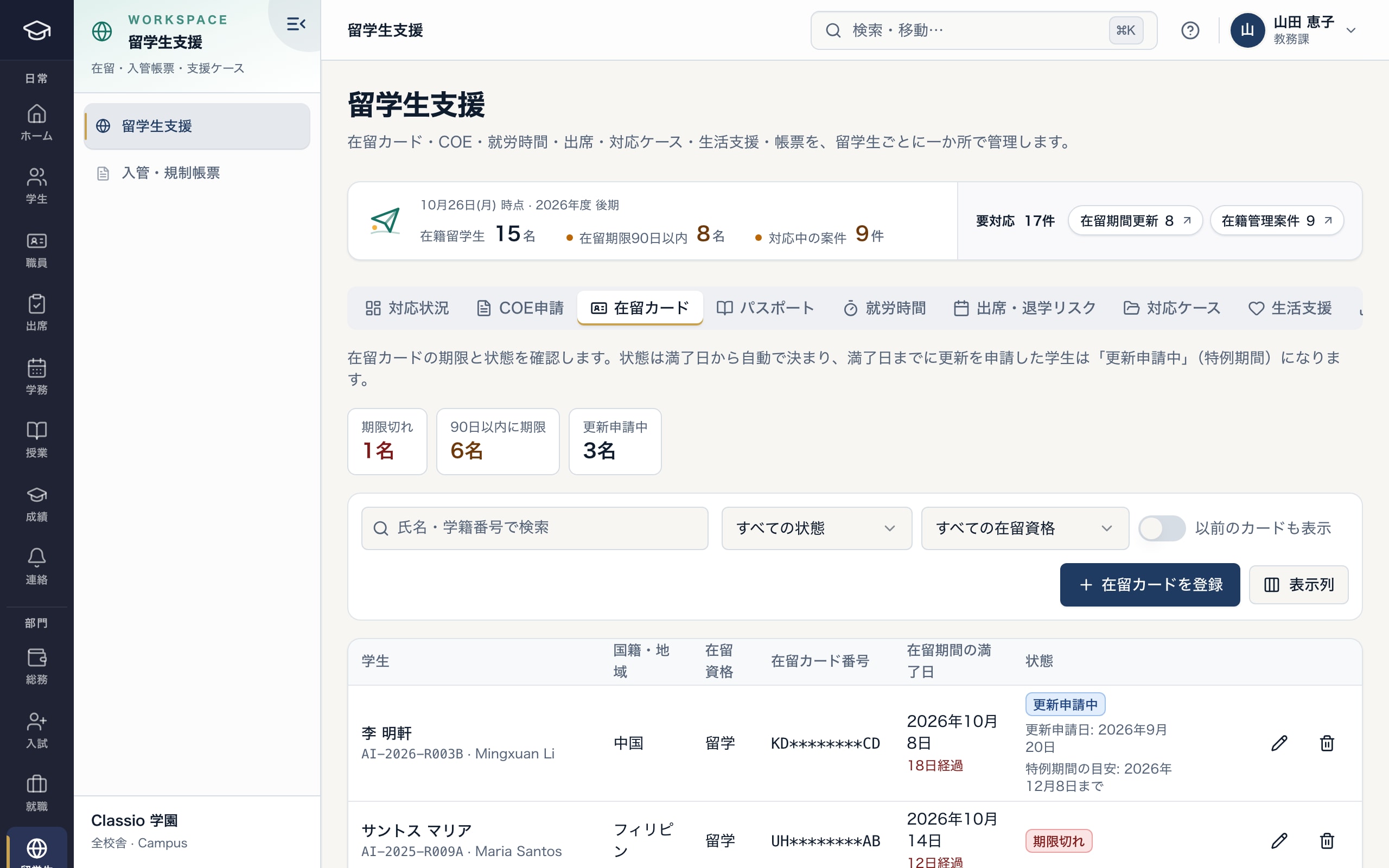
Card status is worked out from the expiry date every day
- Expired, within 90 days and renewal pending
- Renewal pending shows the application date and special period
- Card numbers are masked
Checking permitted work hours week by week
Students with “Student” status may work up to 28 hours a week under their permission, or 8 hours a day during the school’s long vacations. Staff record combined hours from every workplace each week; saving a week over the limit opens a support case.
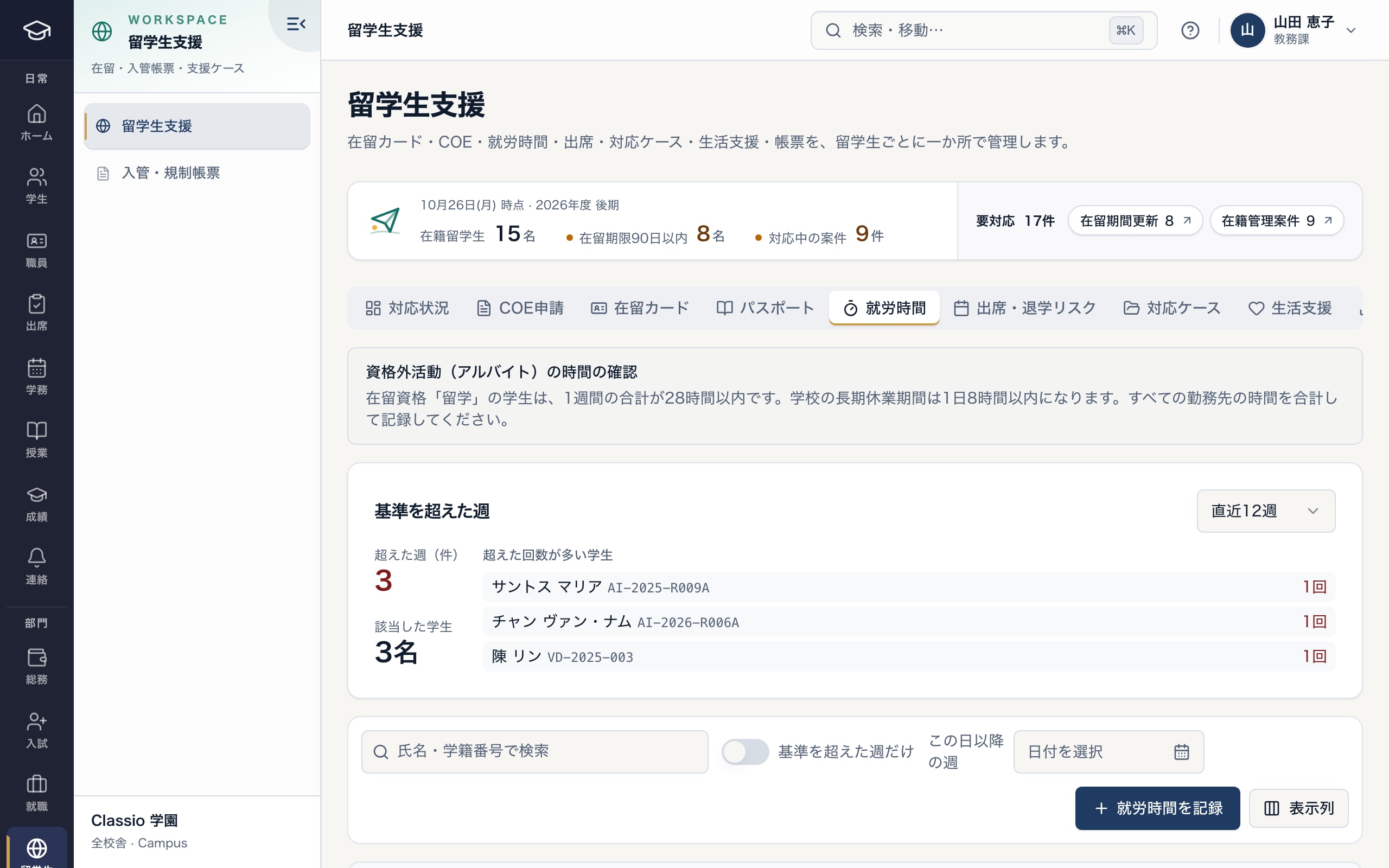
Work hours and weeks over the limit
- 28 hours a week, 8 hours a day in long vacations
- Weeks over the limit and who is most often over
Lists for notifications and reports, and letters to students
A monthly enrolment list (CSV), card and passport deadline lists (CSV) and a monthly attendance report (PDF) are available. Expiry, attendance and withdrawal letters are produced as side-by-side Japanese and English PDFs.
Accredited institutions submit the periodic report on the portal between 1 and 30 June each year. A function that totals its base data (enrolment as of 1 May, attendance rates, graduates and leavers, destinations) by the handbook’s definitions is provided after confirmation at the adopting school; it is not the portal’s input form itself.
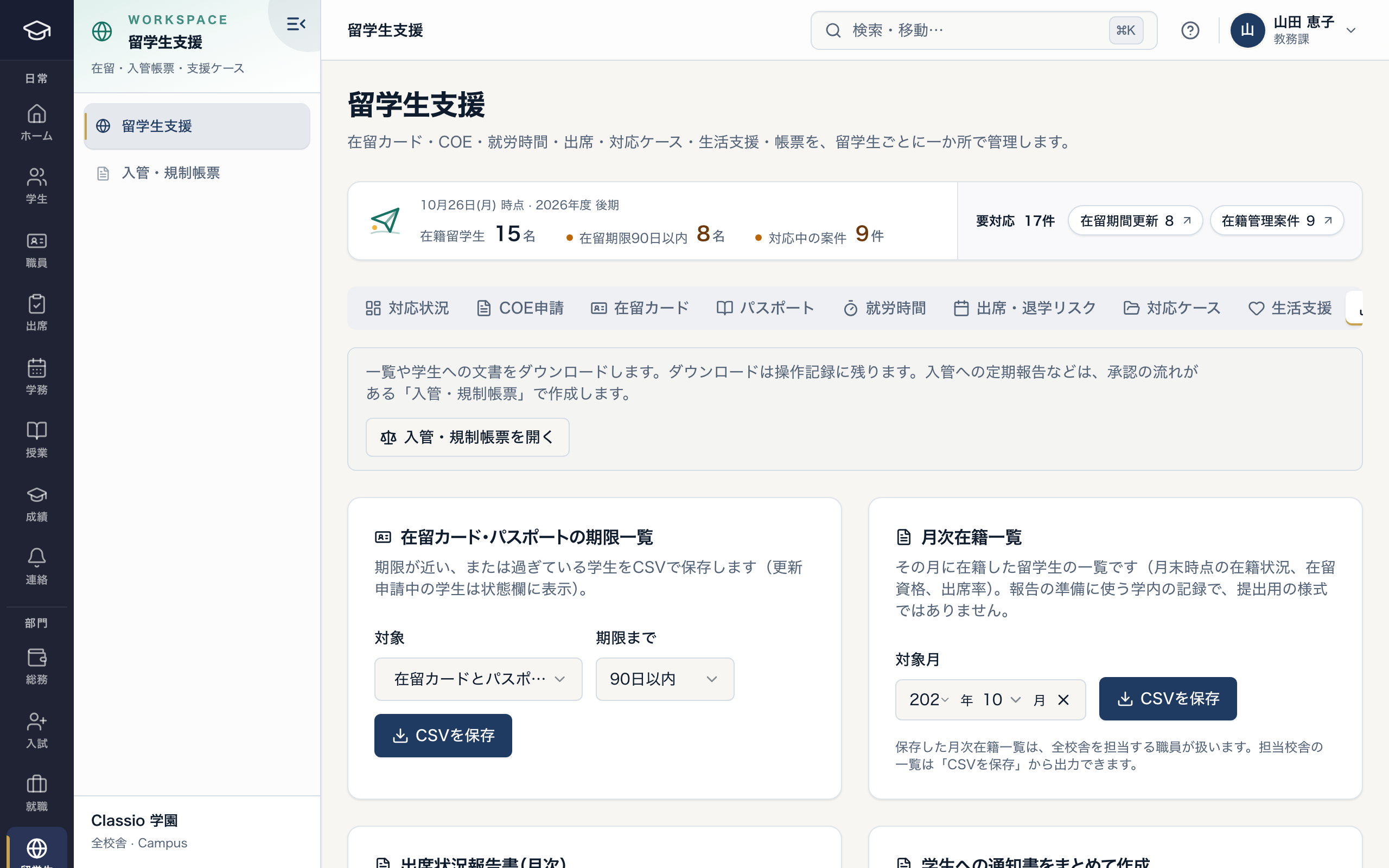
Deadline lists and the monthly enrolment list
- Downloads are logged
- Students with expiring or expired documents (CSV)
- The monthly list prepares reports; it is not a submission form
Rules and Classio’s part in them
Main procedures for Japanese-language schools, what Classio records or exports, and what the school does.
June
Periodic report (accredited institutions, 1–30 June)
1–30 June each year
What Classio records or exports: Totals of the base data (after confirmation at the school)
What the school does: Entering and submitting on the portal
2a year
Acceptance-status notification (as of 1 May and 1 November)
As of 1 May and 1 November
What Classio records or exports: Enrolment and residence records, the monthly enrolment list
What the school does: Notifying the Immigration Services Agency
28hours / week
Permitted work (28 hours a week; 8 hours a day in long vacations)
8 hours a day in long vacations
What Classio records or exports: Weekly records and support cases for weeks over the limit
What the school does: Checking with and guiding the student
90days ahead
Renewal of the period of stay
Reminders at 90, 60 and 30 days
What Classio records or exports: Expiry reminders, application dates and pending renewals
What the school does: Guiding the student’s application
Sources
Regulatory statements follow the scope of the cited documents. External documents do not certify Classio’s behaviour or compliance.
- MEXT Certified Japanese-language Institution Application Handbook, 18 June 2026 edition — Part IX, Periodic reporting procedures (printed p.56 onwards)
- Immigration Services Agency: Notifications on accepting mid- to long-term residents — Start and end of acceptance, and acceptance status as of 1 May and 1 November
- ISA: Permission for activities outside Student residence status — Section 1, blanket permission: 28 hours/week; up to 8 hours/day during institutional long vacations; check individual permissions separately
- MEXT: Creation of the accreditation system for Japanese-language education institutions — Purpose, content and need for the rules
Sources checked: October 18, 2026
Pricing for Japanese-language schools
International student management — residence deadlines, work hours, support cases — is part of PROFESSIONAL. Records only (attendance, grades, fees) start at STARTER.
Amounts use the same calculation as the pricing page (monthly, excluding tax). Staff and guardian accounts are not charged per person.
| School size | Plan | Monthly (excl. tax) |
|---|---|---|
| 120 students, 1 site (with residence management) | PROFESSIONAL | ¥69,800 |
| 300 students, 2 sites (with residence management) | PROFESSIONAL | ¥69,800 |
| 450 students, 3 sites (with residence management) | PROFESSIONAL | ¥83,300 |
| 80 students, 1 site (records only) | STARTER | ¥19,800 |
- 120 students, 1 site (with residence management)
- PROFESSIONAL¥69,800
- 300 students, 2 sites (with residence management)
- PROFESSIONAL¥69,800
- 450 students, 3 sites (with residence management)
- PROFESSIONAL¥83,300
- 80 students, 1 site (records only)
- STARTER¥19,800
What Classio does not do
- File applications or notifications with the Immigration Services Agency, or judge residence status
- Read the residence card’s IC chip (not offered at present)
- Prepare accreditation application documents
Frequently asked questions
- Can Classio read the residence card’s IC chip?
- Not at present. Card number, expiry and status are entered on screen and the deadline is tracked from there.
- Can the school set the attendance threshold?
- Yes: the school’s approved rule is used, or 80% if there is none. How lateness counts is also set in the school’s rules.
- Which languages do students and guardians see?
- Student and guardian screens and some notices can show Japanese, English, Simplified Chinese, Korean and Vietnamese. Letter PDFs are side-by-side Japanese and English. Staff screens are in Japanese.
- What about handover when staff change?
- Card history, support cases with their notes, and the operation log stay on record, so the next person can see what was done.
Start from how you work today
Start from your current attendance register and deadline list.
Tell us your enrolment, sites and the lists you keep today, and we will suggest how to move them and what to start with.