Staff
Staff time and leave, connected to the timetable.
Work rules and monthly close, overtime agreement limits, leave and the annual leave register, cover when someone is away, licences, duties and training, and files for your payroll software. Classio does not calculate pay.
How time and leave flow
T01 Clock in, request leave
Staff
From the staff screens
T02 List what needs cover
Classio
Classes, homeroom, clubs
T03 Approve leave, assign cover
Manager
Cover shows in the timetable
T04 Submit the month
Staff
Corrections with a reason
T05 Approve
Manager
Overtime limits checked
T06 Lock and build the payroll file
Payroll
Approved by someone else
T07 CSV for payroll software
Classio
Pay is calculated there
Who acts, in what order. The “Classio” lane is what the system does by itself.
What staff time and leave management means in Classio
Managing staff time and leave means recording who works and who is away, who covers their classes, and passing the result to payroll. In Classio the staff record, clock-ins and monthly close, and leave with its register connect to the timetable, homerooms and clubs the school already runs, so approving leave immediately lists the classes that need cover. Pay, tax and social insurance are calculated in the school’s payroll software.
Last updated: October 26, 2026
One record per staff member
Teachers and office staff each have one record with employment type and contract terms, placement and school duties, and licences, all with history. Someone who works at several schools has a record at each.
Staff check their own record and request changes to address or contacts. The school chooses what the staff directory shows; phone numbers are hidden by default.
Work rules, monthly close and overtime limits
Time is totalled under the school’s work rules (scheduled hours, cut-off day, flexible working schemes), separating statutory overtime, late-night and statutory-holiday hours. Staff submit the month, a manager approves and payroll locks it. A locked period takes no clock-ins, and original punches stay on record after corrections.
Overtime agreement limits are shown per person by month, year and 2–6-month average, and anyone over 80% of a limit is flagged. For private K–12, time on site beyond scheduled hours is shown alongside.
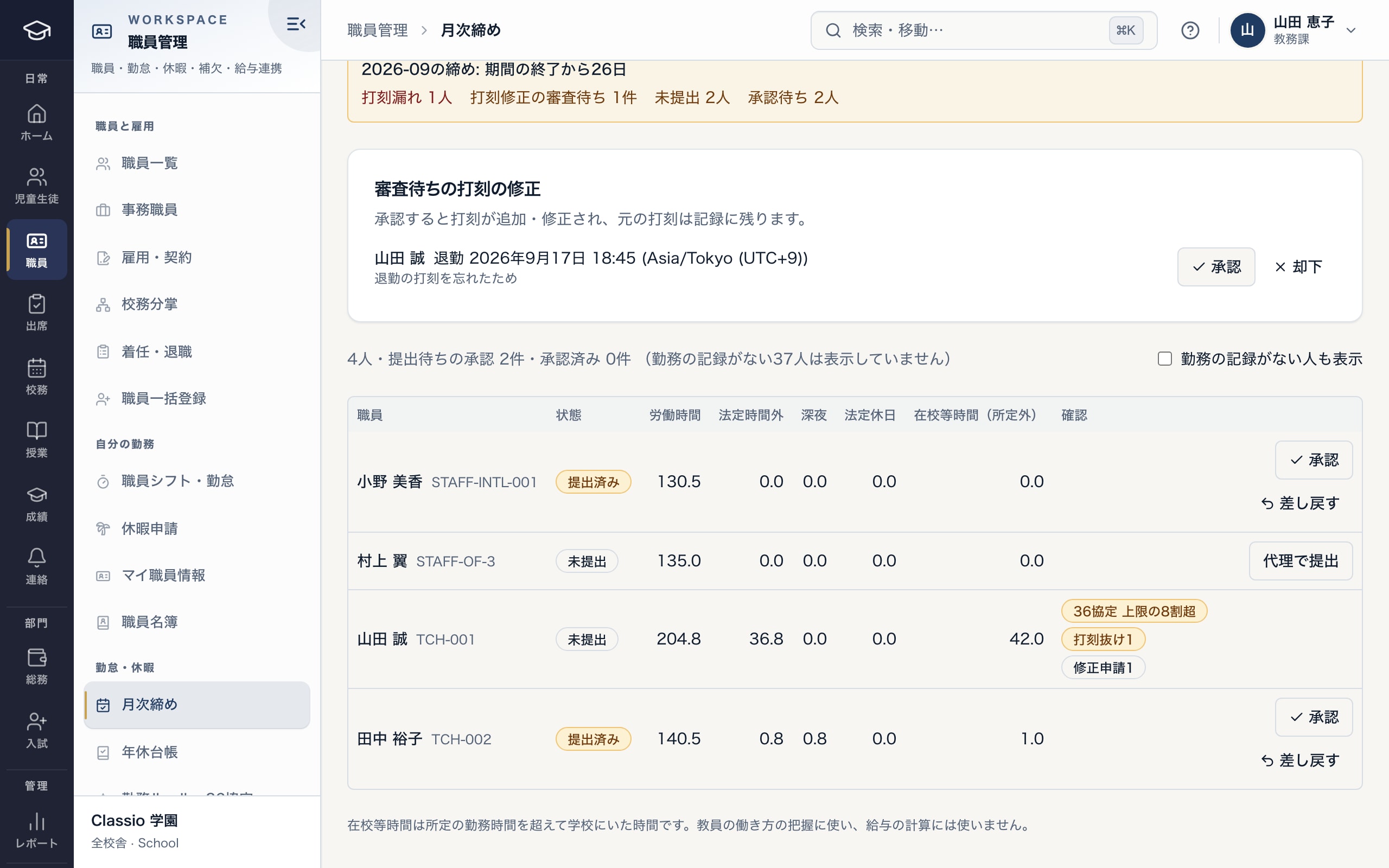
Approve submitted time and see who is close to the overtime limit
- Corrections are requested with a reason; the original punch stays on record
- People over 80% of an overtime limit are flagged
- For private K–12, time on site beyond scheduled hours is shown too
Leave and the annual leave register
Leave is requested by type; approval deducts it from the register exactly once, and withdrawal or rejection returns it exactly once. Annual leave is granted at the statutory days from service length and weekly scheduled days, and expires after two years.
The five-day obligation is tracked per grant year with the people still short listed. The annual leave register exports as CSV. Leave notifications never carry the reason.
Cover when someone is away
When leave is approved or someone calls in sick, the classes, homeroom periods, club sessions and appointments left without staff appear on the cover board, with suggested teachers who are free then, licensed for the subject, under their overtime limit and have covered least this term.
Assigning cover writes it into the timetable, notifies the substitute and shows on students’ and guardians’ timetables.
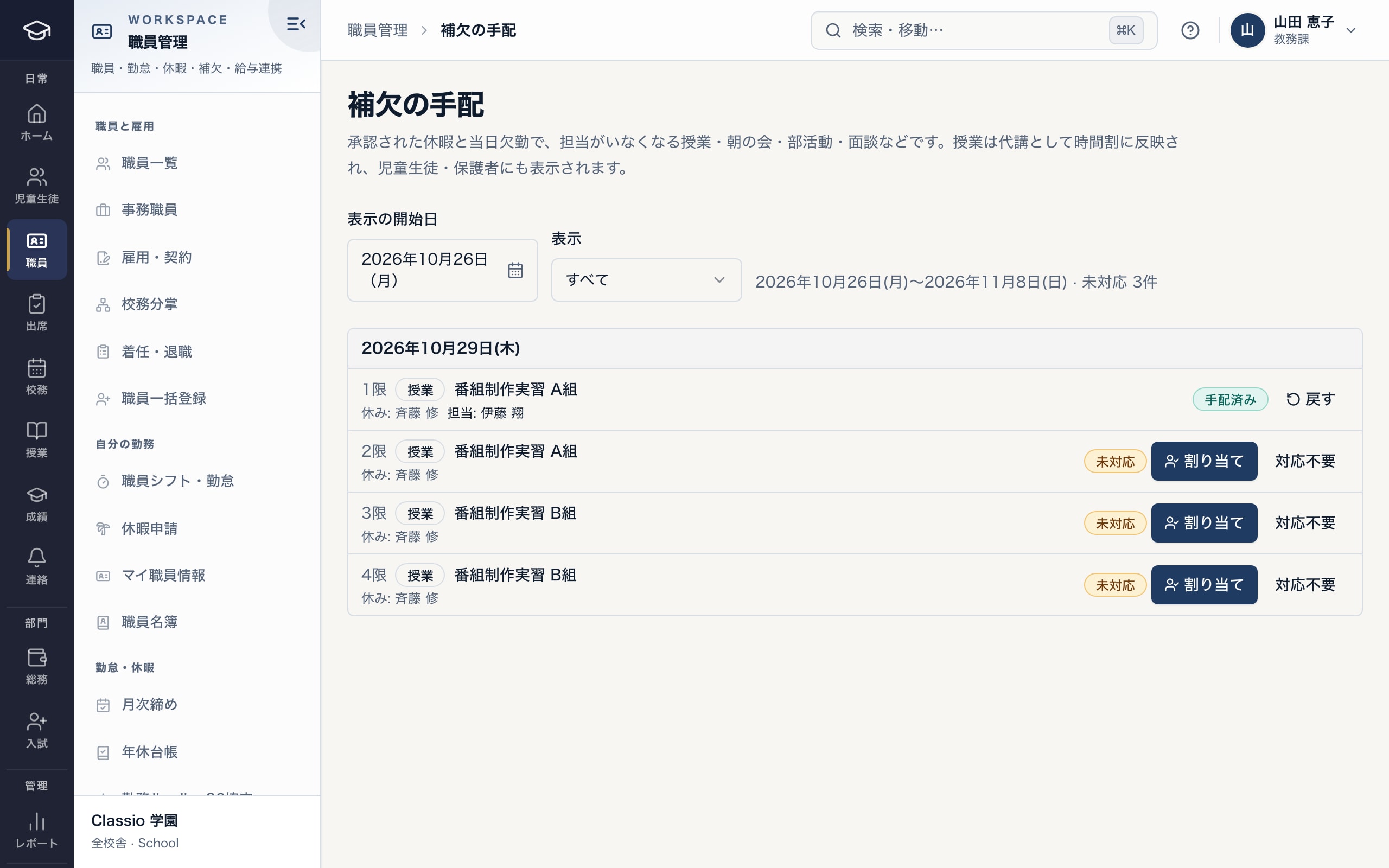
Lessons left without a teacher by approved leave, with cover chosen for each
- Open items in the two weeks shown
- Cover becomes a substitute lesson in the timetable
- Open lessons are assigned from teachers who are free
Licences and duties, workload and training
Assigning a class without the matching subject licence warns and records the out-of-subject permission. Licence and qualification expiries are flagged 90 and 30 days ahead. Joining and leaving follow checklists; leaving cannot complete while a homeroom has no new teacher unless an administrator accepts the gap.
The workload view lists lessons, homerooms, clubs, school duties, overtime and cover per person, highlighting values well above average. Training requirements and due dates are set per role.
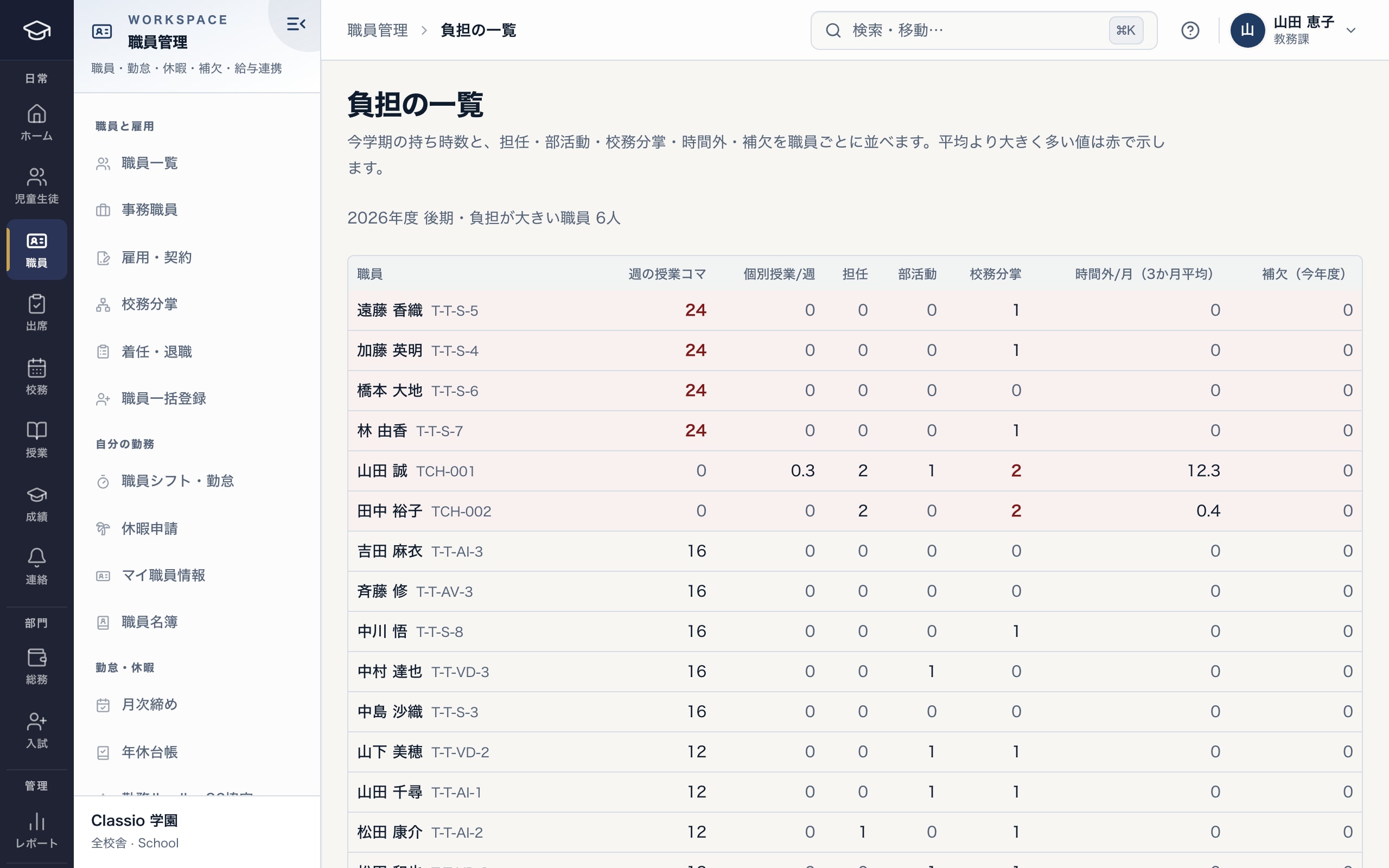
Lessons, homerooms, clubs, overtime and cover, person by person
- Lessons, homerooms, clubs, duties and overtime per person
- Values well above average in red, and how many people carry them
- Cover taken this year, to keep it fair
Files for payroll software (no pay calculation)
Locked timesheets, approved leave, lesson counts and allowances (homeroom, club, trips and more) are combined, and only a batch approved by someone other than its maker becomes a payroll CSV: the Money Forward Cloud Payroll format, or a generic CSV with chosen columns.
Pay, tax, social insurance and payslips stay in the school’s payroll software. Classio does not store My Number or bank account numbers. Corrections after locking go out as a correction linked to the original.
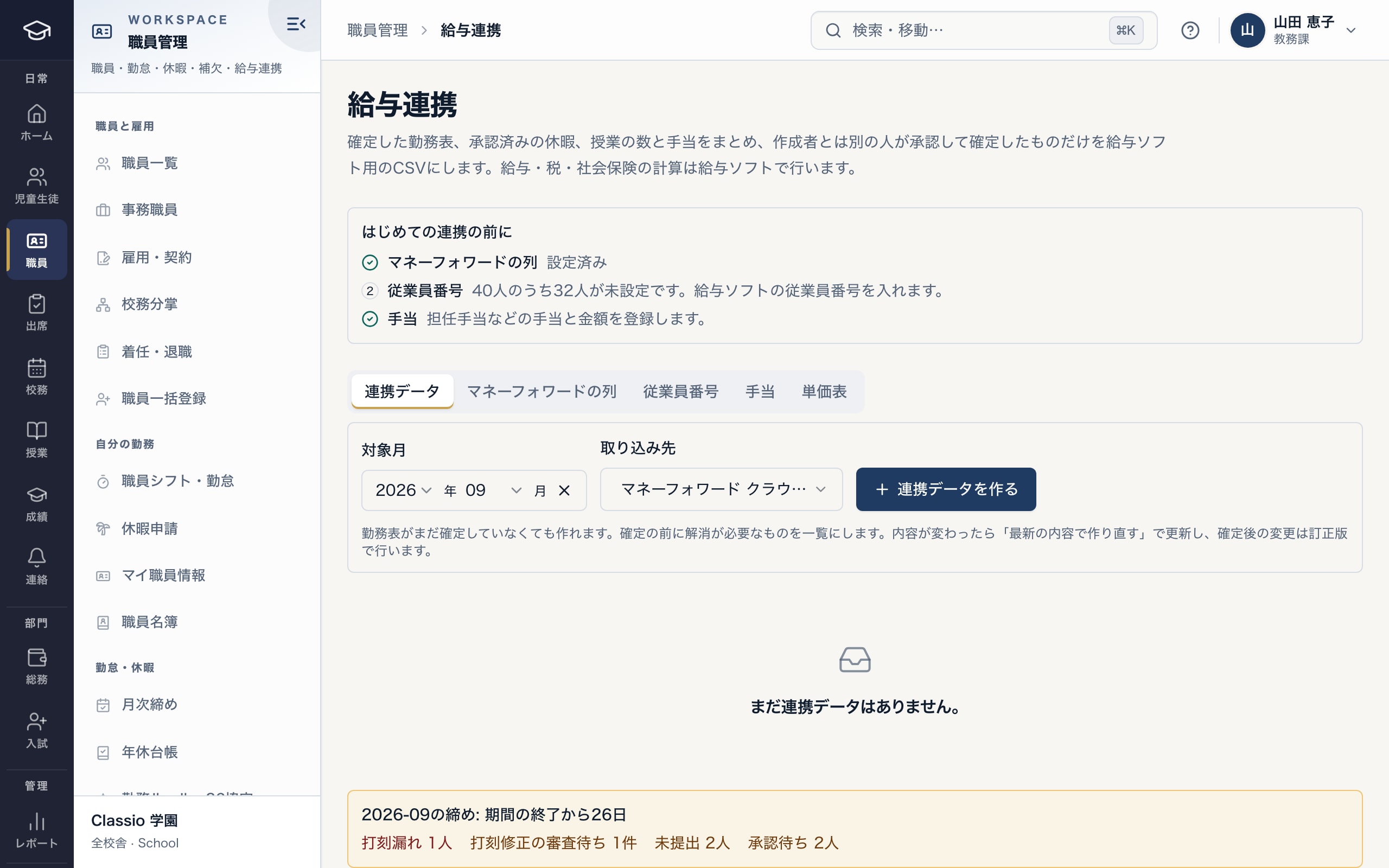
Build the file for payroll software from locked time (no pay calculation)
- Checks columns, employee numbers and allowances first
- Money Forward Cloud Payroll format, or a generic CSV
- Pay is calculated in payroll software; only approved batches export
Workforce overview
One screen shows headcount by employment type, the share of part-time teachers, contracts ending within 90 days, people reaching the right to an open-ended contract, overtime trends and the five-day leave gaps. Teacher counts also serve official surveys.
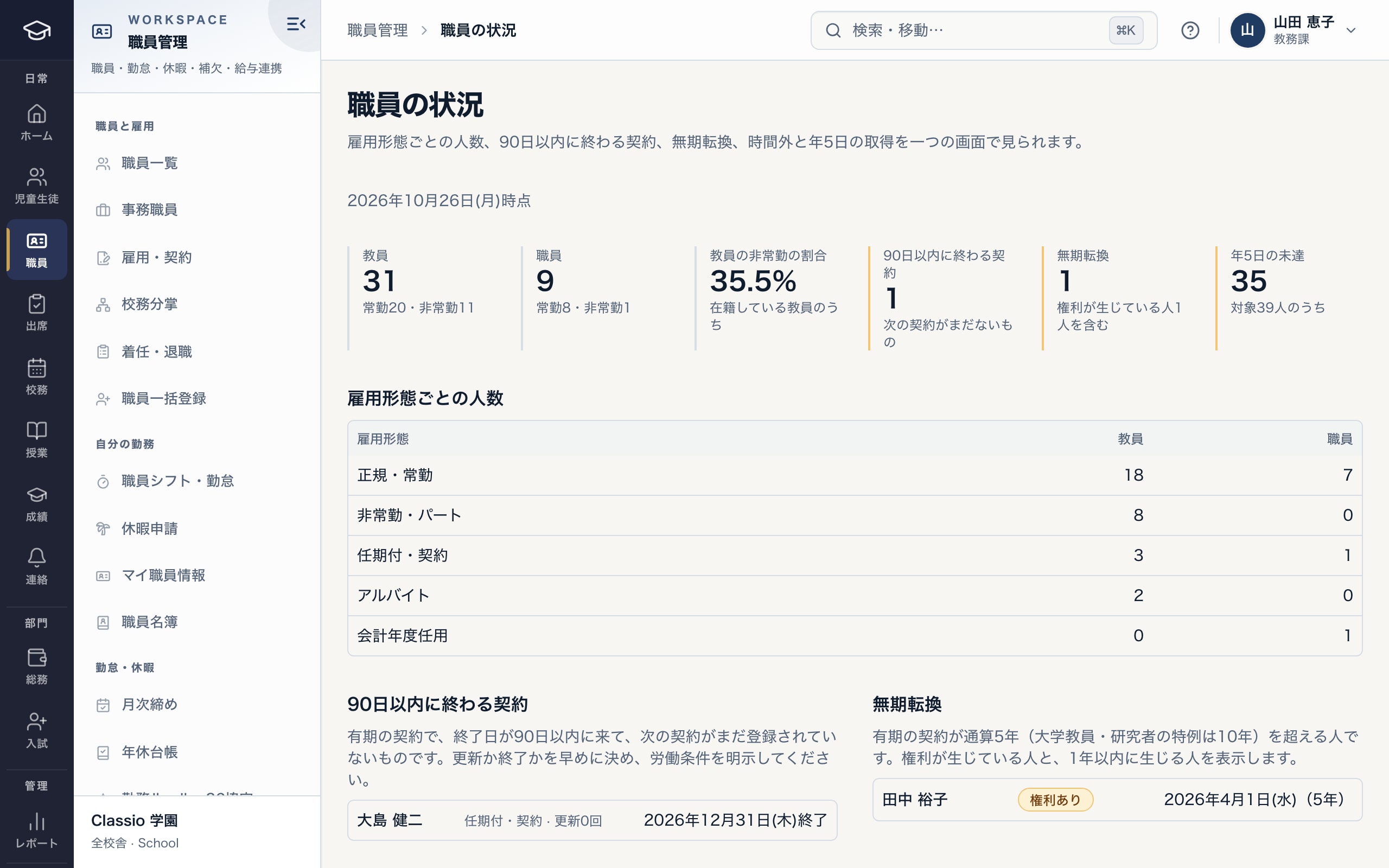
Headcount by type, contracts ending, open-ended rights and the five-day rule on one screen
- Headcount by employment type and the part-time share
- Contracts ending within 90 days and open-ended contract rights
- People short of five leave days
Common situations
- Someone forgot to clock out
- They request a correction with a reason; once a manager approves, the punch is added. The original and the correction stay on record.
- A teacher is suddenly absent
- A same-day absence lists what needs cover just like approved leave, with suggested teachers to choose from.
- A mistake is found after locking
- A locked period changes only through an audited reopen; the payroll file is rebuilt as a correction linked to the original.
- A part-time teacher’s contracts pass five years
- The workforce overview lists people with, or within a year of, the right to an open-ended contract (ten years under the university and researcher rule).
Differences by kind of school
- Private K–12Mostly cover arrangements and time on site.Private K–12 page
- Vocational schools and universitiesMostly part-time teachers’ contract terms and renewals, and lesson-based allowances.Vocational schools page
- Cram and lesson schoolsTutor shifts and clock-ins with per-lesson rates feed the payroll file.Cram and lesson schools page
- Nursery and kindergartenCare assignments feed the staffing-ratio check.Nursery and kindergarten page
Sources
Rules are described within the scope of the cited sources. External sources do not certify how Classio works or that it complies with any law.
- Labour Standards Act (e-Gov law search, checked 26 October 2026)
- MHLW — guideline on employers’ measures to keep accurate track of working hours (checked 26 October 2026)
Sources checked: October 18, 2026
Plans
Staff records, the directory, licence checks, joining and leaving and teacher counts are in every plan. Work rules and monthly close, leave and the register, cover, workload and training, and payroll files start in Standard, and the workforce overview in Professional (plans for vocational schools, language schools and universities). The private K–12 plan includes all of them.
See pricing and plansWhat it does not do, and what to check
- It does not calculate pay, tax or social insurance, run year-end adjustment or produce payslips.
- It does not store My Number, bank account numbers, health checks or stress-check results.
- It does not write work rules: the school enters scheduled hours and overtime agreement figures after checking them with its labour adviser.
- Before importing into payroll software, the school checks the columns against its own payroll settings.
Start from how you work today
Try the time and leave screens in the demo.
No registration: three minutes with a sample school’s monthly close, workload view and workforce overview. Tell us how you track time and run payroll today, and we will suggest how to connect them.