Reports
Count from daily records, and use the results to prepare reports.
Attendance, grade, career, enrolment and fee reports, a list of students who may need support, lists for preparing the school basic survey and JASSO enrolment checks, and MEXT education data standard exports — and where Classio’s role stops.
From records to report preparation
R01 Keep daily records
Staff
Attendance, grades, payments, outcomes
R02 Count
Classio
Counting rules on screen
R03 Check students needing support
Administrators
Risk analysis
R04 Produce scheduled exports
Classio
Logged and audited
R05 Check the preparation figures
Administrators
School basic survey, JASSO…
R06 Transcribe and submit
School
Submission stays with the school
Who acts, in what order. The “Classio” row is what the system does by itself.
Reports in Classio
Classio’s reports turn the daily records of attendance, grades, careers, enrolment and fees into figures for the school’s own decisions and for preparing official surveys. Each screen shows how it counts, and missing records are treated as “no record”, never zero. Filling in and submitting official forms stays with the school; Classio produces reference figures and lists to prepare them.
Last updated: October 26, 2026
Internal reports: attendance, grades, careers, enrolment, fees
Reports shows attendance, grades, careers, enrolment and fees for a chosen year and department. Attendance is shown with its breakdown: approved absences count as present and excused absences leave the denominator. Grades count locked grades only, and placement rates use students seeking work as the denominator.
Each tab explains its counting rules. A zero denominator shows “—”, never 0%.
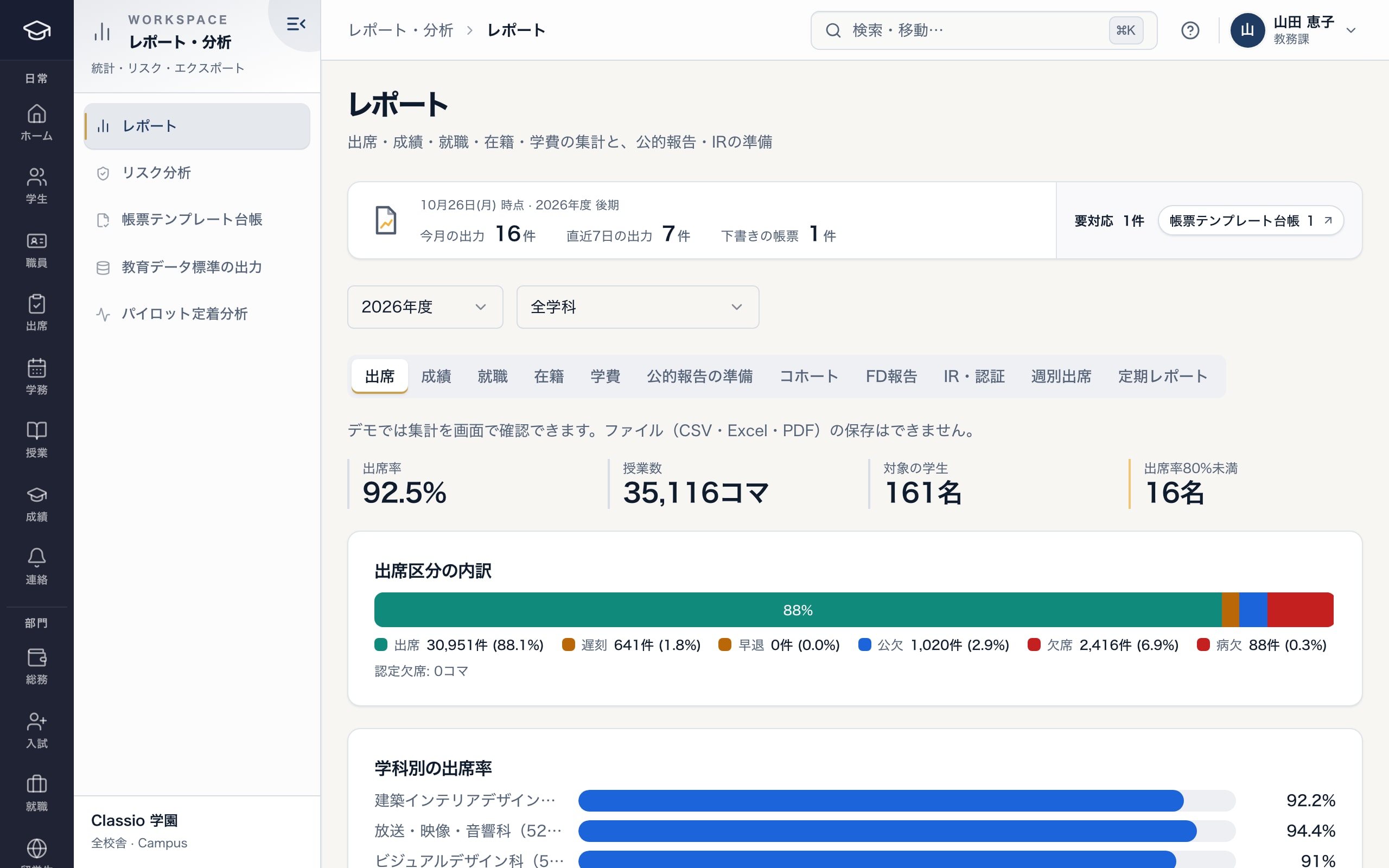
Attendance rate, its breakdown and department figures
- Rate, lessons, students and those below the threshold
- Breakdown, with excused absences left out of the denominator
- Rates by department
Find students who may need support, by fixed rules
Risk analysis scores attendance, locked grades and overdue fees from 0 to 100 and groups students as high, medium or low; attendance below 70% is always high. No AI is used.
Missing records add no points and are never treated as perfect, and students with no attendance or grade records are counted separately. A risk level starts support; it does not decide progression or graduation.
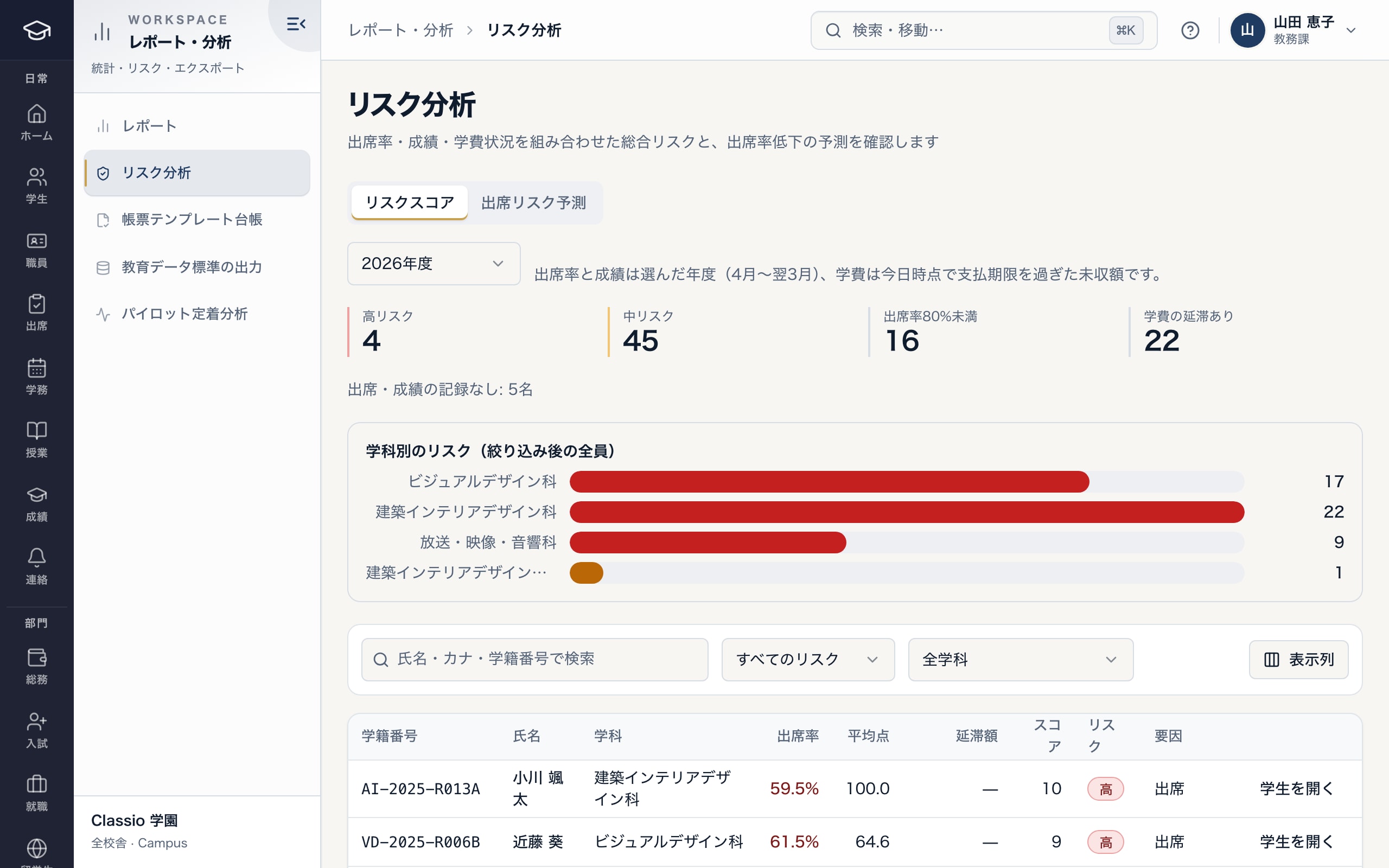
Students who may need support, from attendance, grades and fees
- High and medium risk
- Students without records counted separately
- Risk factors: attendance, grades, fees
Lists for preparing official surveys and reports
Official report preparation produces a school basic survey preparation count (enrolment by department, year and sex, entrants, last year’s graduates and those employed, teacher numbers and more), enrolment counts, career outcome counts and the JASSO scholarship enrolment check list. All are reference figures for preparation, not the survey forms themselves; check the forms and definitions before transcribing.
CSV files for schools, students, staff, attendance and more can be exported with the field names of MEXT’s education data standard (version 5.1). It is Classio’s own mapping, not certified conformance, and leaves out addresses, contacts, residence card numbers and sensitive information.
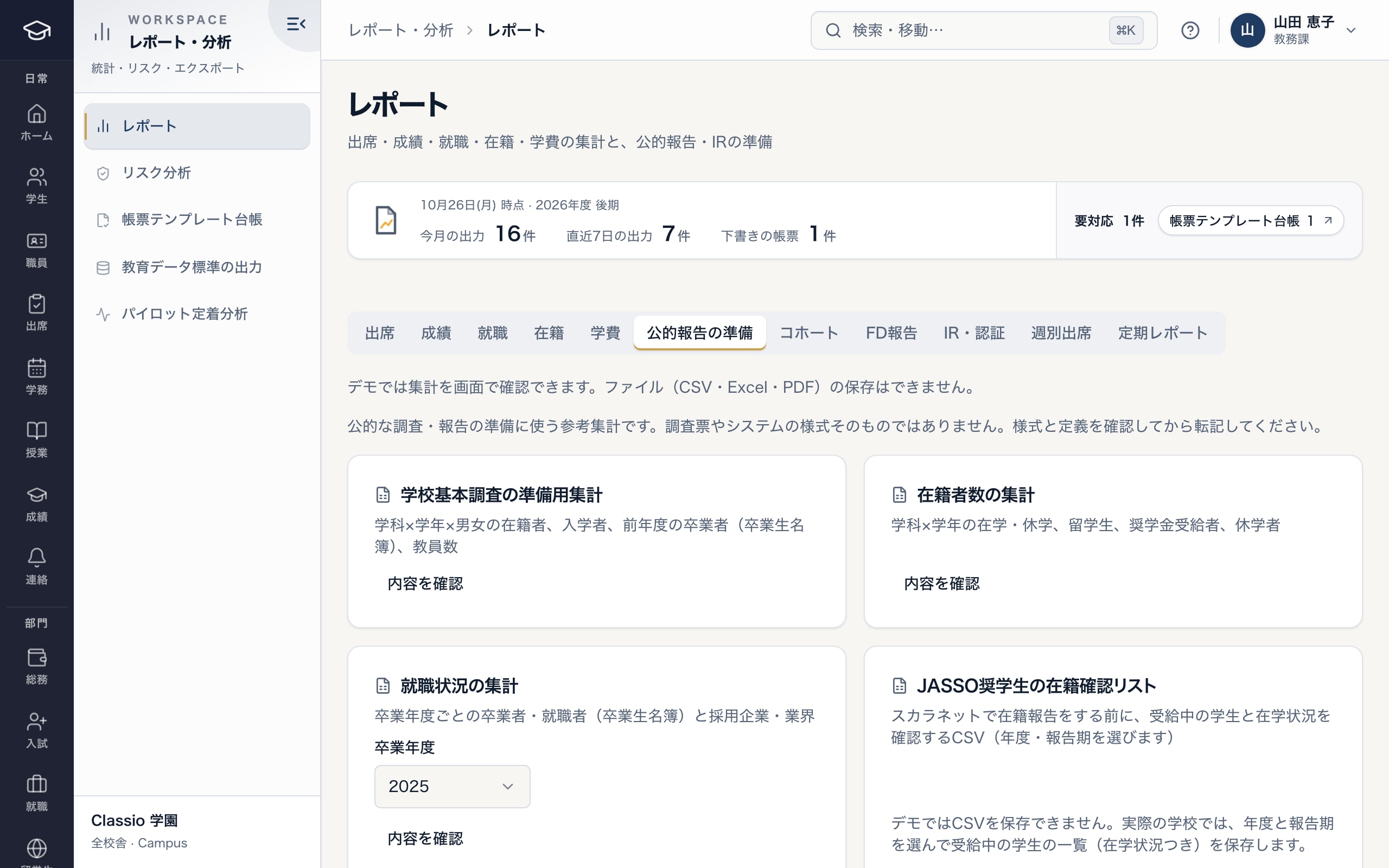
Reference figures for preparing surveys and reports
- Not the survey forms themselves
- School basic survey preparation count
- JASSO enrolment check list, checked before entering into Scholarnet
Scheduled exports and the export record
Scheduled reports produce an enrolment count CSV (on the 1st of each month), the JASSO check list (June and December) and an attendance summary (daily). Files go to the school’s private storage and can be downloaded only by staff with whole-school access.
Every export leaves an export record and an audit entry holding field names and counts, not values. Official report files can be produced only from a template the school has approved.
Awkward cases
- The school basic survey counts as of 1 May
- The preparation count uses the day it is made as its reference date; make it on 1 May or check the records before transcribing.
- Include grades not yet locked
- Grade reports count locked grades only and show how many are not yet locked.
- Submit the JASSO check directly
- Classio does not submit. Check the CSV, then enter it into Scholarnet.
- Campus-limited staff need an official count
- Official preparation uses whole-school figures, so only staff with whole-school access can produce it.
Differences by kind of school
- Vocational schoolsSchool basic survey preparation, career outcomes and attendance.Vocational schools
- Japanese-language schoolsBase data for the certified institution periodic report and monthly international-student enrolment lists.Japanese-language schools
- Universities and junior collegesJASSO enrolment checks and figures for institutional research and accreditation.Universities
- Private K–12Report card, cumulative record and transcript data, exported after the school’s forms are checked.Private K–12
Sources
Regulatory statements follow the scope of the cited documents. External documents do not certify Classio’s behaviour or compliance.
- MEXT School Basic Survey overview (Japanese) — reference date 1 May each year and scope
- MEXT — Education data standard, version 5.1 (Japanese)
Sources checked: October 18, 2026
Which plans include it
Attendance, grade, enrolment and fee reports, risk analysis, official report preparation and education data standard exports are included from STARTER. Career reports are from STANDARD; monthly international-student enrolment lists from PROFESSIONAL.
See pricingWhat it does not do
- Classio does not submit to government or agency systems; the school transcribes and submits.
- The figures are not officially certified.
- The certified Japanese-language institution report is base data under the guide’s definitions, not the portal’s input form itself.
Start from how you work today
See the report screens in the demo.
No registration: three minutes with sample data in the attendance and grade reports, risk analysis and official report preparation. Tell us how you prepare reports today and we will suggest how to start.