Messages and announcements
Reach students and guardians, and know who read and acknowledged.
Announcements with read and acknowledgement tracking, safety checks, emergency messages and absence notices, delivered in-app, by browser and app push, LINE and email — with the delivery order, quiet hours and LINE costs explained.
The delivery order
L01 Record in the notification centre
Classio
Shown at once
L02 App or browser push
App / browser
If delivered, LINE is skipped
L03 Send by LINE
LINE
To linked, consenting people
L04 Switch to email
Email
When nothing else reached them
L05 Keep the delivery log
Classio
Including reasons for not sending
Which channel a notice goes to, and in what order.
School messaging in Classio
School messaging means getting what matters to students and guardians and checking it was read and acknowledged. In Classio every notice is first recorded in the recipient’s notification centre; if app or browser push reaches them, LINE is skipped; if not, LINE is used, and if nothing reaches them, email. Announcements record read and acknowledged as separate states.
Last updated: October 26, 2026
Delivery order and quiet hours
Every notice is first recorded in the recipient’s notification centre. People who receive browser or Classio app notifications get those first, and LINE is skipped when they arrive. If neither LINE nor push reaches someone with an email address, Classio switches to email.
Fee, emergency, safety and account notices always go by email as well. Everyday notices such as attendance and grades are not emailed to people reached by LINE or the app.
If the recipient sets quiet hours, LINE and push wait until the quiet period ends; nothing is skipped. Urgent notices such as consecutive absences, safety and emergency announcements and school-bus arrivals go out immediately.
Send announcements; record read and acknowledged separately
Announcements go to people chosen by role, campus, department, year or class, or to individually selected students. The audience is fixed at publication, and the text, audience and acknowledgement settings cannot be changed afterwards.
When content must be confirmed, require acknowledgement with a deadline. Opening marks it read; pressing Acknowledge marks it acknowledged, and staff who manage it see each recipient’s state. Those who have not acknowledged can be reminded; after the deadline reminders go automatically and administrators get the count.
Recipients using another display language receive a translation when the school has turned on automatic translation, including by LINE and email.
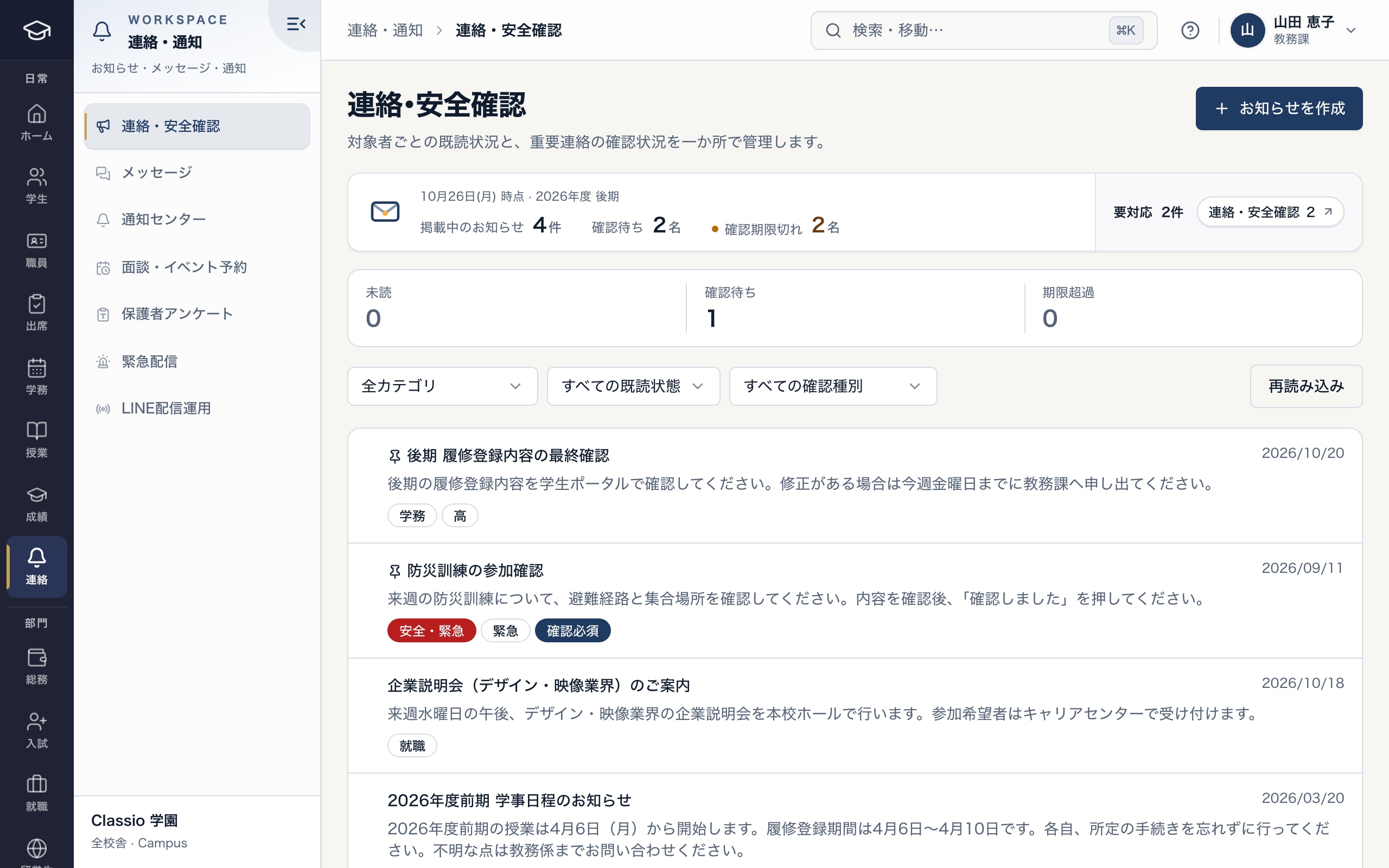
Unread, awaiting acknowledgement and overdue, per announcement
- Unread, awaiting and overdue counted separately
- Safety and emergency notices ignore quiet hours
- Acknowledgement-required notices are followed to the click
Emergency messages and absence notices
Emergency messages such as closures or evacuations go out from Emergency broadcast to the groups you choose. People linked to LINE get LINE; everyone else, and anyone LINE does not reach, gets email, whatever their notification settings.
Students and guardians report absence, lateness and early leave in Classio. At cram and lesson schools, guardians can simply write to the school’s LINE account in everyday words and Classio reads the date, child and lesson. Notices are kept separately from lesson attendance records.
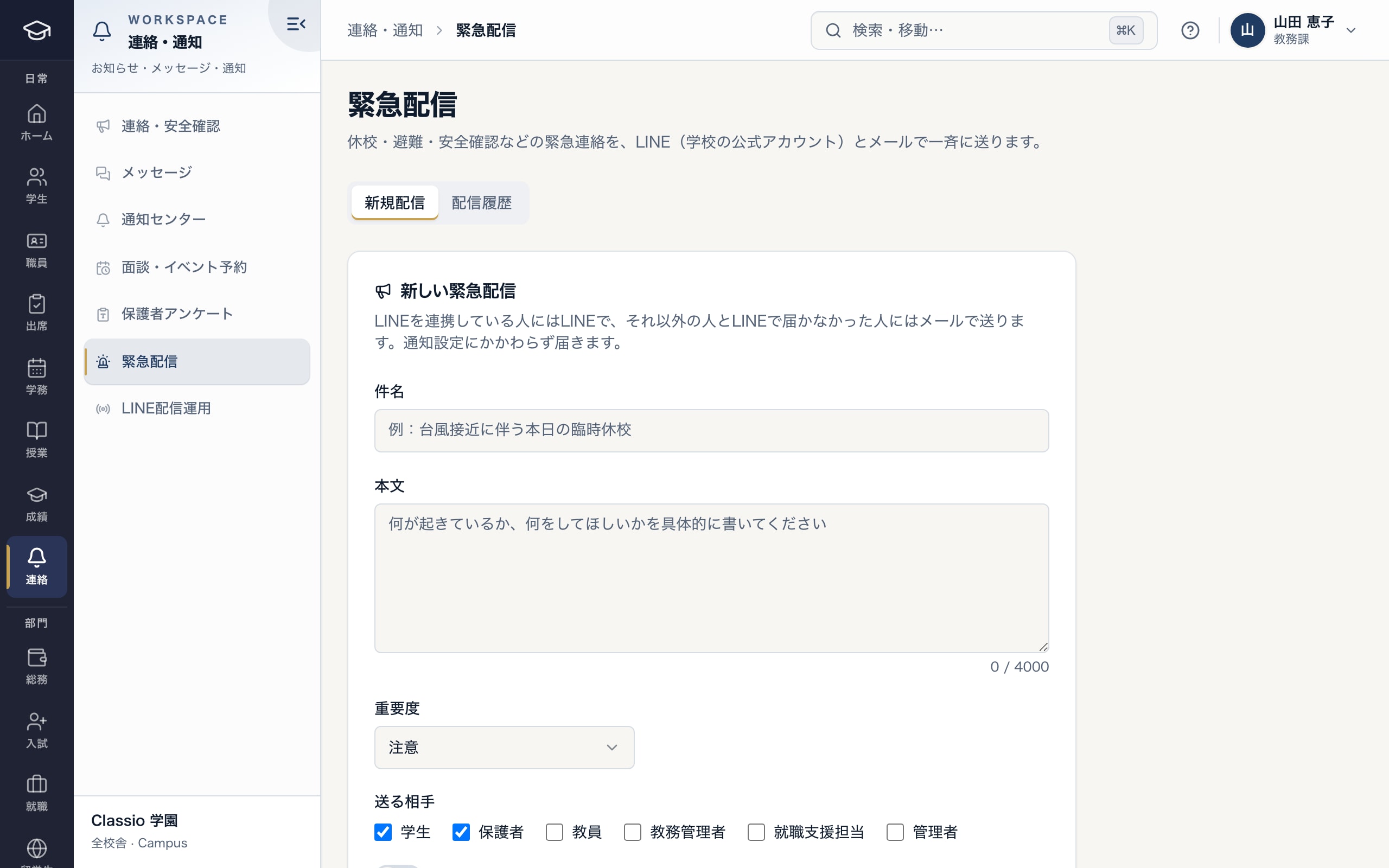
Emergency messages to chosen groups
- Email when LINE does not reach someone
- Choose the severity
- Choose recipients by role
Using LINE: setup and costs
Delivering by LINE needs the school’s own LINE Official Account. When a student or guardian links Classio with LINE, that counts as consent to LINE notices; they can switch LINE off in their notification settings.
LINE message fees follow the school’s LINE Official Account plan and are paid by the school to LY Corporation. LINE is skipped when app or browser push arrives, which reduces LINE sends; the skipped count appears in LINE delivery operations.
What messaging costs
| Channel | Cost |
|---|---|
| Notification centre, browser push, Classio app | Included in Classio’s price |
| LINE | Paid by the school to LY Corporation under its LINE Official Account plan |
| Included in Classio’s price |
LINE plans change from time to time; check LY Corporation’s page for the current details.
Awkward cases
- A guardian is not linked to LINE
- LINE is not used; the notice arrives by push or email instead, and the delivery log records why.
- No notices at night
- Recipients can set quiet hours; notices wait until the end. Safety and emergency announcements arrive immediately.
- A published announcement needs correcting
- Published announcements cannot be edited; send a correction as a new announcement.
- Someone says the email did not arrive
- Check the delivery log and resend failures; also check the recipient’s mail settings.
Differences by kind of school
- Vocational schools and universitiesMostly to students, with acknowledgement for registration and submissions.Vocational schools
- Private K–12Guardian messages, morning absence notices and school collection notices.Private K–12
- Cram and lesson schoolsArrival notices, LINE absence notices and make-up information.Cram and lesson schools
Sources
Regulatory statements follow the scope of the cited documents. External documents do not certify Classio’s behaviour or compliance.
Sources checked: October 18, 2026
Which plans include it
Announcements, read and acknowledgement tracking, absence notices and LINE integration are in every plan. Emergency broadcast is from STANDARD for vocational schools, Japanese-language schools and universities.
See pricingWhat it does not do
- SMS to mobile numbers is not available.
- Delivery can fail because of the recipient’s device or mail settings; the delivery log shows what happened.
- Read means opened and acknowledged means the button was pressed; neither proves the content was understood.
Start from how you work today
See the messaging screens in the demo.
No registration: three minutes with sample data in announcements and emergency broadcast. Tell us how you contact families today and we will help you prepare LINE as well.