Fees and billing
Bill fees, confirm payments, spot unpaid fees early.
Create bills by department and year, record payments, approve waivers and refunds, send due-date reminders, follow up unpaid fees and export journals for accounting software — one money record per student.
How fees move
F01 Create bills
Finance / admin
By department, year, item and month
F02 Remind before and after the due date
Classio
30, 14, 7 days before; 1 and 30 after
F03 Pay
Student / guardian
Transfer, counter or online
F04 Record the payment
Finance / admin
Partial payments kept apart
F05 Approve waivers and refunds
Approver
Not the creator
F06 Follow up and export journals
Finance / admin
CSV for accounting software
Who acts, in what order. The “Classio” row is what the system does by itself.
Fees in Classio
Fee management means billing each student, confirming payments and acting early on anything overdue. In Classio bills, payments, waivers and refunds sit on the same student record, and waivers and refunds take effect only after someone other than their creator approves them. Fees go to the school’s own account; Classio never holds the money.
Last updated: October 26, 2026
Create bills by department, year, item and month
For each fee item — tuition, admission, facilities, materials, exam fees — set the amount per department, year and billing month. Spreading an item over several months makes instalments. Billing setup creates the bills for enrolled and on-leave students by department and year in one go.
Each item can allow or refuse partial payment; the default comes from the school’s rules.
Record payments and spot overdue fees
Finance staff record bank transfers, cash at the counter and other payments. Amounts above the balance are refused; part-payments are kept as partly paid. Bills past their due date appear in the Overdue list, where Act takes you to recording a payment, a waiver or a document.
Where online payment is used, fees go straight to the school’s own Stripe account. A bill is marked paid only when the payment provider confirms it — returning from the payment page does not count.
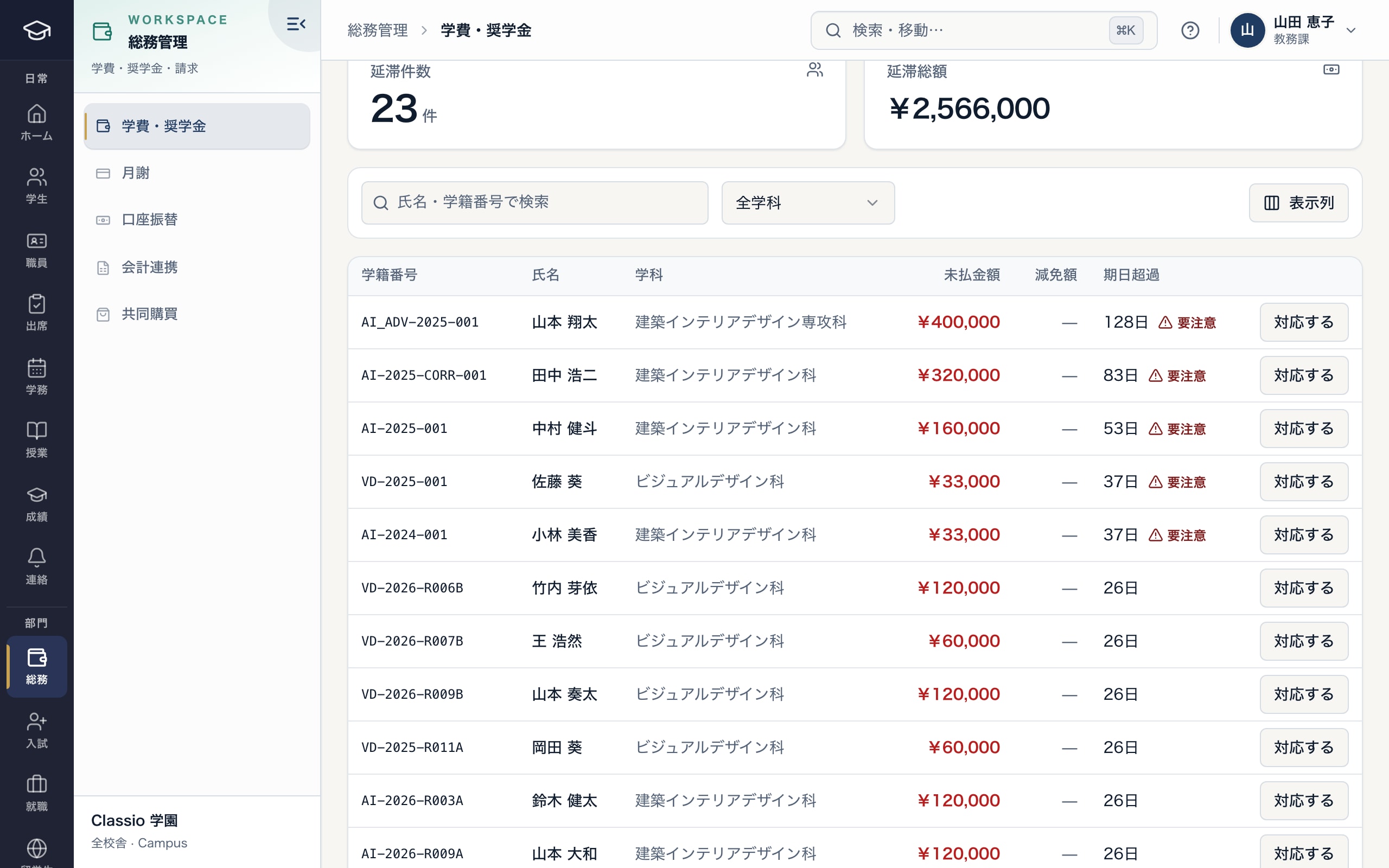
Overdue bills, longest first
- Number and total overdue
- Days past due, with a caution mark
- Record a payment, waive or issue a document
Reminders, demand notices and unpaid follow-up
Every day at 8:00 Japan time Classio checks unpaid and partly paid bills and notifies linked guardians 30, 14 and 7 days before the due date and 1 and 30 days after. The school decides whether students also get them (off by default). Quiet hours delay reminders; they are never skipped.
For monthly lesson fees, Unpaid follow-up shows each family’s status, with demand notices, contact notes and drafted messages. Amounts and dates come from the records; AI writes only the wording, and staff check before sending. One notice per bill per 24 hours.
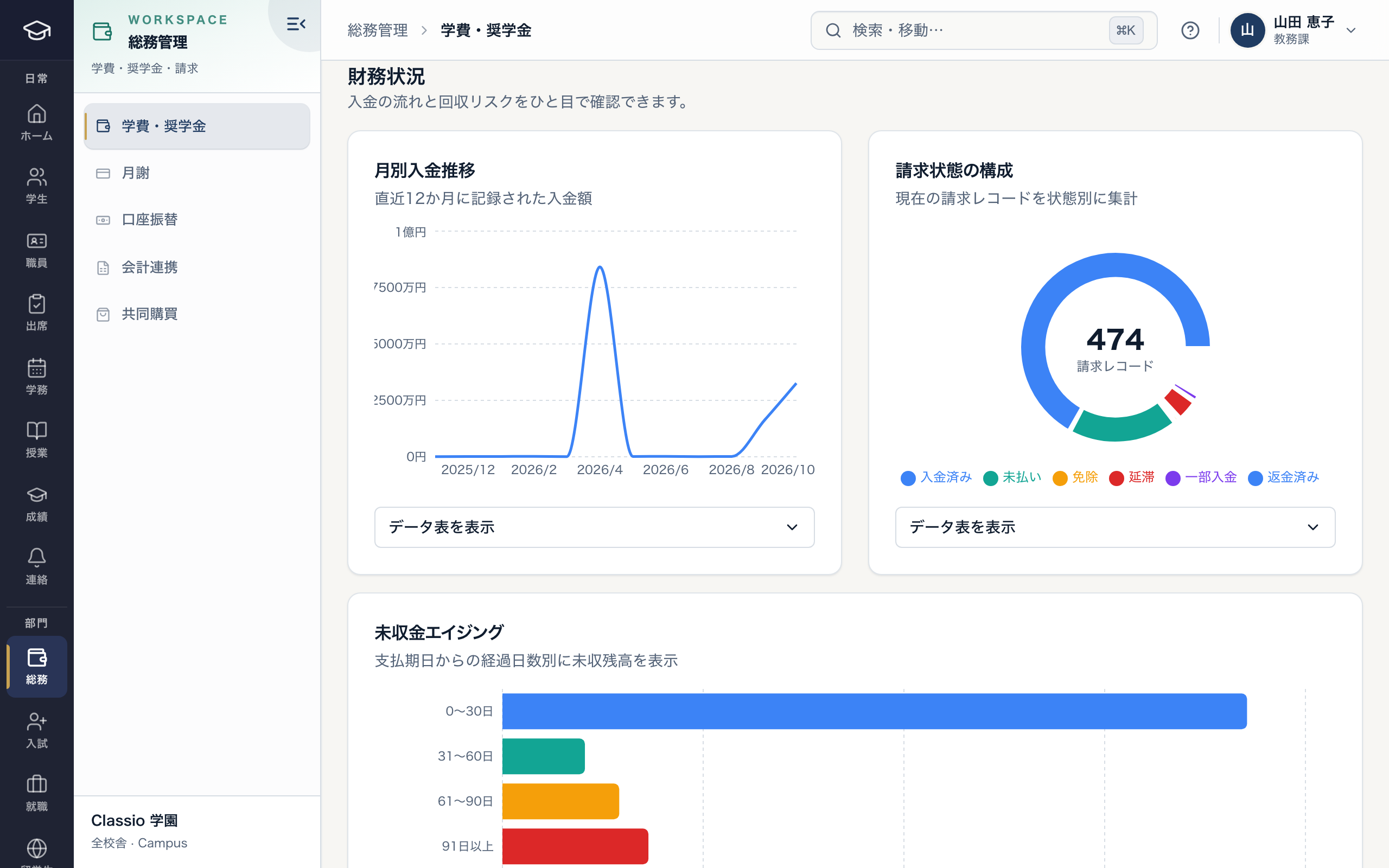
Payment flow and outstanding balances by age
- Payments recorded over 12 months
- Bills by status
- Outstanding balances by days past due
Waivers and refunds are approved by someone else
Full or partial waivers and refunds are created as requests and take effect only after someone other than their creator approves them. Non-administrator approvers can be given a yen limit. Every decision is audited.
Refunds of online payments are recorded when the payment provider confirms them. Scholarships are kept as award records; they do not change bills automatically.
Export journals for accounting software
Accounting export builds monthly journals from tuition, childcare fees, lesson bills and corporate bills, in freee (振替伝票), Money Forward Cloud (仕訳帳) or generic CSV, for up to 12 months, in Shift_JIS or UTF-8.
The default accounts and tax categories are placeholders; set them with your accountant before exporting. Classio does not replace accounting software.
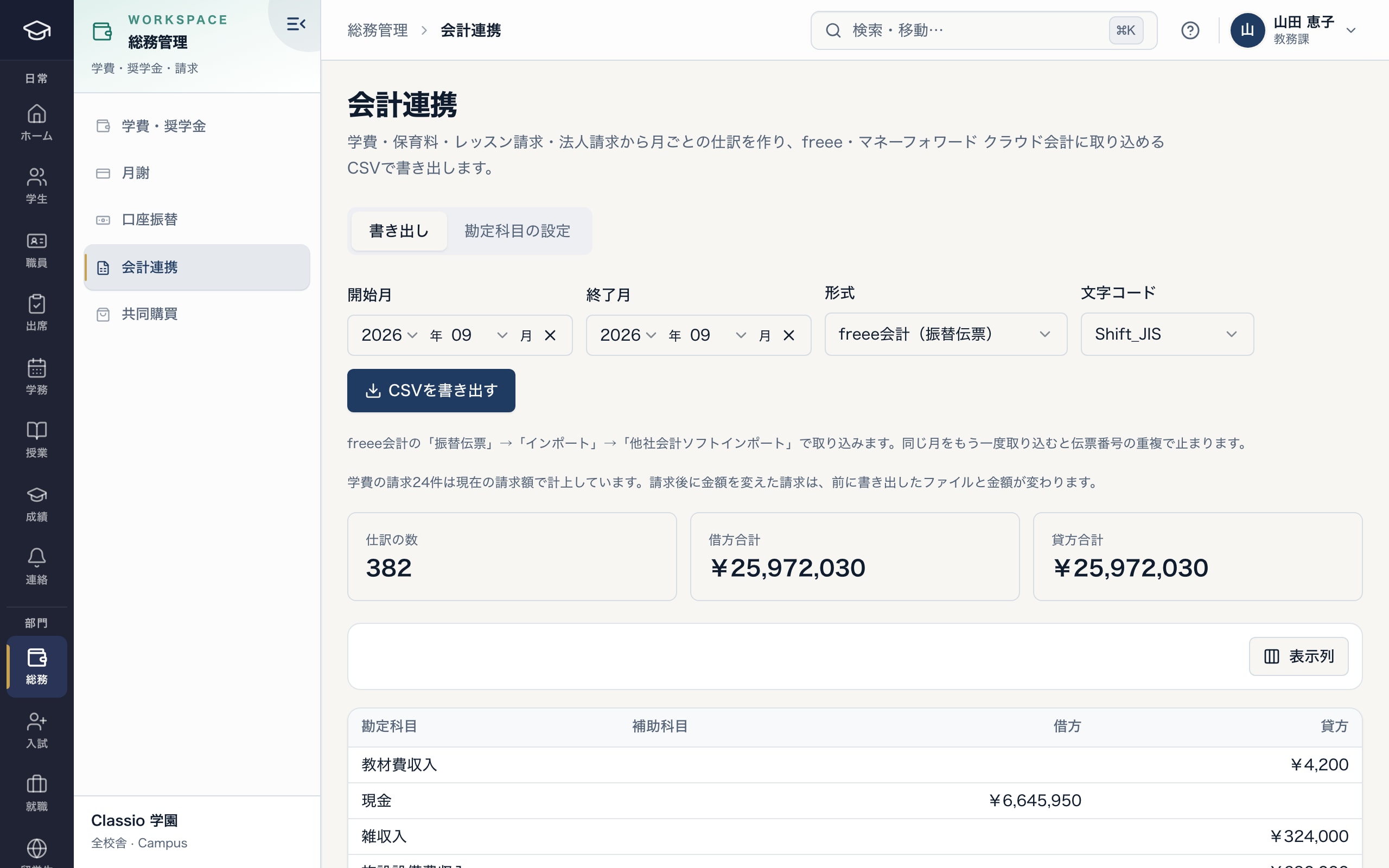
Monthly journals in your accounting software’s format
- freee, Money Forward Cloud or generic CSV
- Shift_JIS or UTF-8
- Bills changed after billing differ from earlier exports
- Journal lines and debit and credit totals
Awkward cases
- Only part was paid
- The bill stays partly paid and reminders continue for the rest. Items that refuse partial payment accept only the full balance.
- The family returned from the payment page but the bill is not paid
- It is marked paid when the payment provider confirms payment.
- A reminder went out after the family paid
- Paid bills get no reminders, so record payments before the reminder time.
- A refund is needed
- Create a refund request; someone else approves it. Record the refund when it is paid back.
- Students should not see fees
- The student home card, fee page and fee notices are separate school settings, all off by default; guardians always see fees.
Differences by kind of school
- Vocational schools and universitiesFees split by term or month; turn on student visibility where students pay themselves.Vocational schools
- Japanese-language schoolsOverdue fees sit beside enrolment and attendance on the same record.Japanese-language schools
- Private K–12School collections billed and confirmed on guardians’ phones.Private K–12
- Cram and lesson schoolsMonthly fees from lesson agreements, with family-by-family follow-up.Cram and lesson schools
Which plans include it
Billing, payments, waivers, refunds, reminders and accounting export are included from STARTER. Monthly lesson fees and K–12 school collections are in those editions’ prices.
See pricingWhat it does not do
- Card and konbini payments are offered after the school opens its own Stripe account and target-environment checks are done. Payment fees are the provider’s; Classio adds no commission on fees.
- Direct debit is offered after a contract with a collection agent and checks in the school’s environment.
- It does not replace school-corporation accounting; the export is for importing into accounting software.
- Bank statements are not matched automatically.
Start from how you work today
See the fee screens in the demo.
No registration: three minutes with sample data in the overdue list, the finance overview and accounting export. Tell us how you bill and confirm payments today and we will suggest how to start.