Universities and junior colleges
From course registration to degree audits: academic records for junior colleges and smaller universities.
Registration periods and review, timetables, grade approval and locking, degree audits and certificates, set per department and entry year. Universities with a core system can start with one faculty or programme.
Lines this school uses
- Build the timetable
- Check for clashes
- Enrol required subjects, open a period
- Choose electives and submit
- Approve, reject or waitlist
- Update the roster
- Enter and save scores
- Calculate final mark and grade
- Submit for review
- Approve or return
- Lock
- Ask for a review
- Request
- Check eligibility
- Make the preview
- Approve and release
- Download the PDF
- Check by QR code
- Register the residence card and passport
- Remind 90, 60 and 30 days ahead
- Apply for renewal
- Record the application date
- Record weekly work hours
- Produce lists and letters
What Classio is for universities and junior colleges
For junior colleges, smaller universities, special courses and correspondence programmes, Classio handles course registration, grade locking, degree audits and certificates on each student’s record. It is not a replacement for a large university’s campus-wide core system; we check scale and scope with you before starting.
Last updated: October 26, 2026
The academic calendar, and the records Classio keeps
A common term pattern. Each item links to the section that explains it.
April / SeptemberRegistration periods and review
During termLessons and attendance
End of termGrades entered, approved and locked
After lockingAppeals
End of yearDegree audit and shortfall list
Run registration periods with review and capacity
Create periods per year and term and move them through open, locked and closed. Each period chooses review, first-come or lottery and a credit cap; the school also chooses the reviewer (office, homeroom teacher or either) and whether review is per subject or per submission.
Required subjects can be enrolled per department and year in one go. Approved registrations become the attendance and grade rosters.
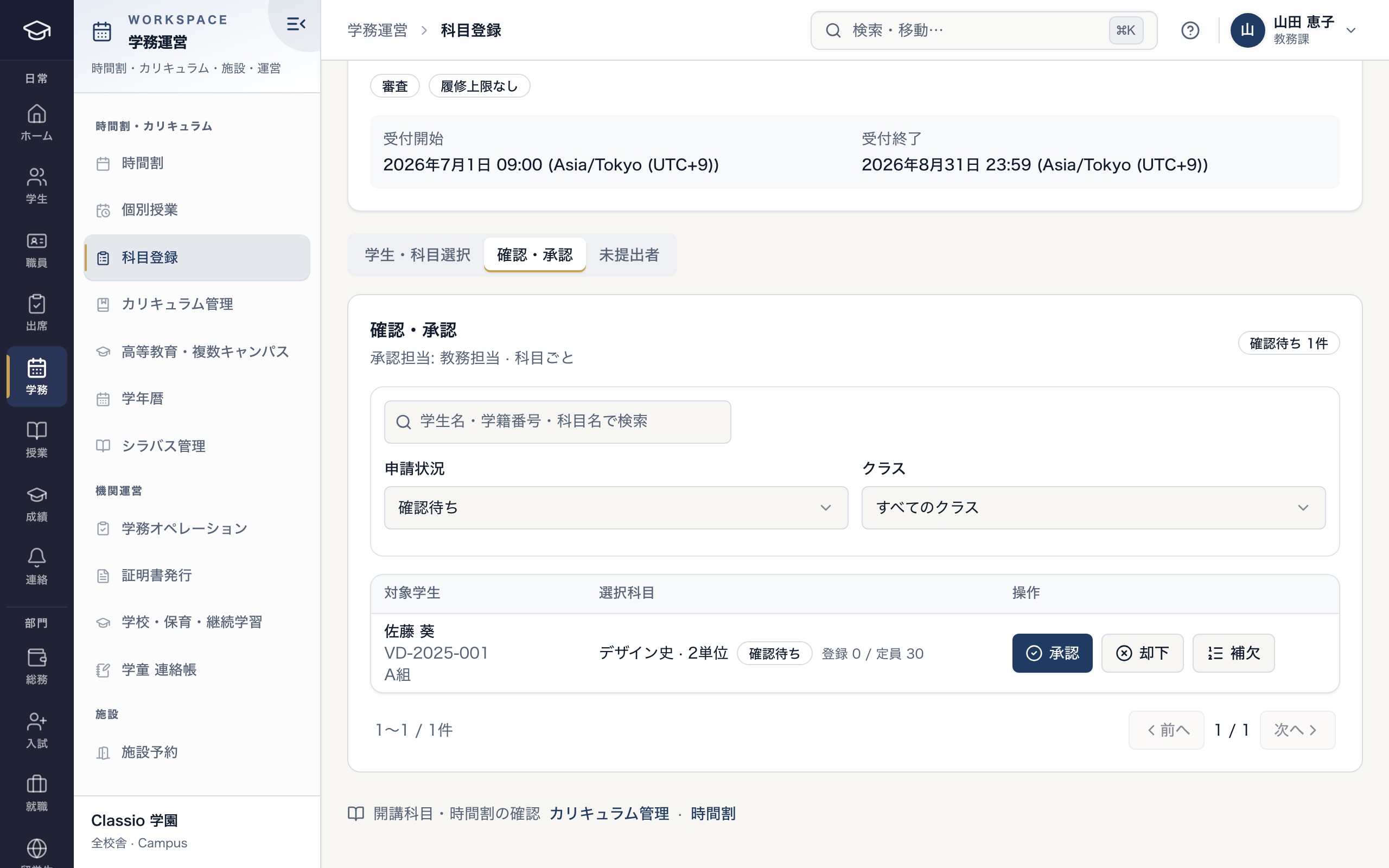
Elective requests reviewed by the school’s chosen reviewer and unit
- Allocation and credit cap per period
- Reviewer and unit of review
- Approve, reject or waitlist
Grade entry, approval, locking and appeals
Teachers enter and submit grades per class; administrators approve and then lock them. Submitters cannot approve their own grades.
Students can ask for a review of any locked grade; approval reopens only that student’s grade, and appeals are decided by someone other than the person who raised them.
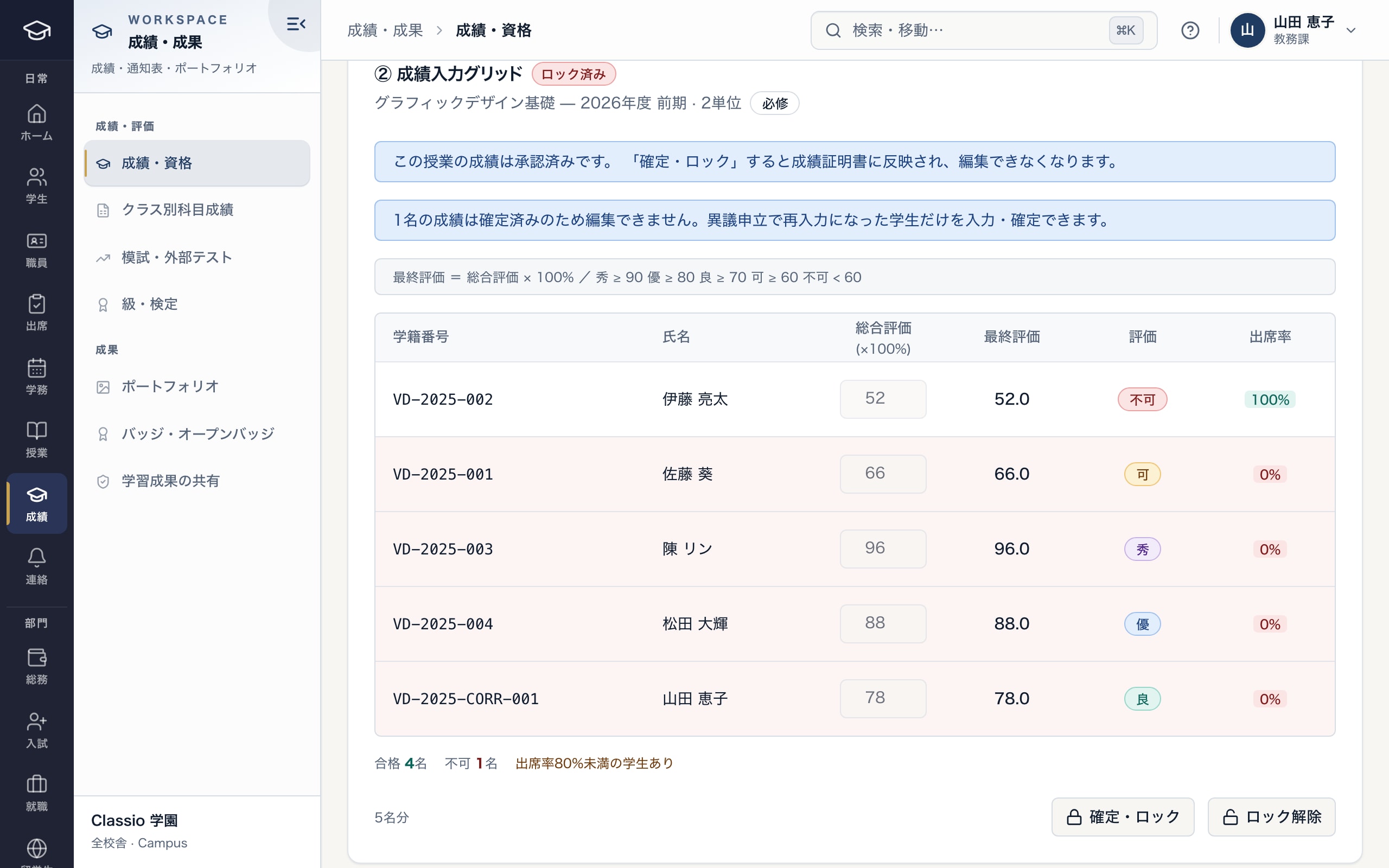
Checking approved grades before locking them
- Approved; locking sends them to transcripts
- Formula and grade bands
- Lock
Check graduation requirements and list shortfalls
Requirements are set per department and entry year: required subjects, electives, minimum credits, minimum grade, attendance, qualifications and practical hours — plus schooling hours and graded reports for correspondence courses. Approved credit recognition counts toward credits.
Each student shows the share of requirements met and a list of those not yet met. The share counts requirements, not credits. An expected graduation date appears only when every requirement is met.
Student counselling and reasonable accommodation
Counselling records are read only by counsellors and social workers — not administrators or teachers — and are never used by AI, exports or student lists.
For disabled students’ reasonable accommodation, there are screens recording the request, constructive dialogue, a decision per accommodation, the accommodation letter, review and appeal. Staff are designated by an administrator; letters carry only the agreed wording and need the student’s consent. Check against the school’s own rules before live use.
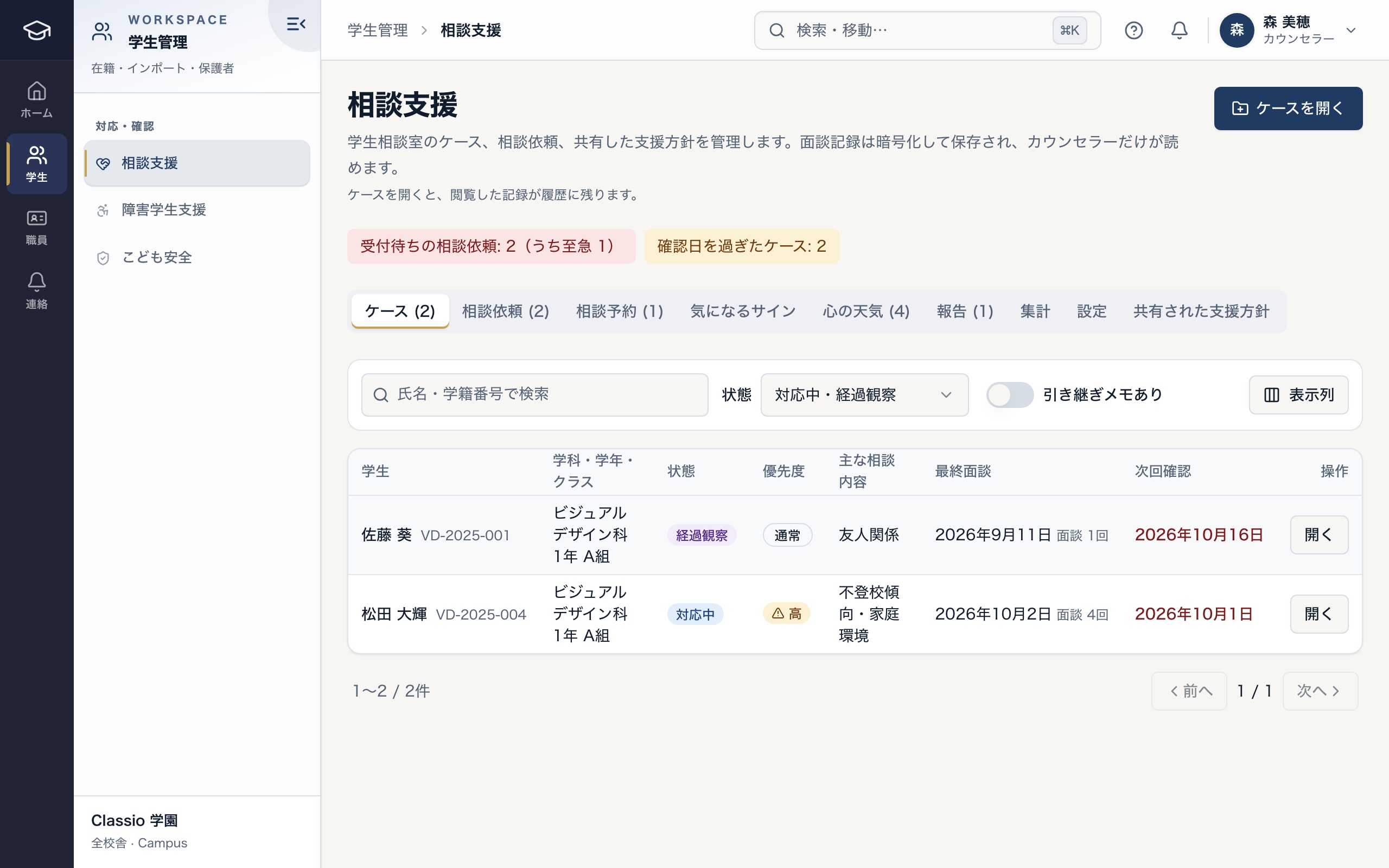
Counseling cases and requests; session records are readable by counselors only
- Open requests and cases past their check date
- Cases, requests, appointments, mood check-ins, reports
- Session records are stored encrypted and readable only by counselors and social workers
Correspondence programmes and published syllabi
Correspondence programmes have their own policy settings for undergraduate, junior college and graduate levels, schooling registration and attendance, course credit (submit, approve, lock) and a separate completion decision. Each university confirms its policy and rules before going live.
Syllabi can be published on public pages for chosen courses only (overview, objectives, weekly plan, assessment, textbooks, practical experience and more).
Scale and single sign-on
Single sign-on supports SAML 2.0 and OIDC on ENTERPRISE. Connection with the university’s IdP (such as Shibboleth) is checked per university, and students’ accounts must be linked in advance.
Procurement documents are prepared on request. Starting with one faculty, special course or graduate school is possible.
Rules and Classio’s part in them
Standards behind academic work at universities and junior colleges, what Classio records, and what stays with the institution.
Graduation requirements (university standards)
What Classio records or exports: Requirements per department and entry year, met and unmet per student
What the school decides or submits: Conferring graduation
Credit recognition
What Classio records or exports: Locked grades and credit recognition records
What the school decides or submits: Grading and recognising credit
Reasonable accommodation (disability discrimination law)
What Classio records or exports: Request, dialogue, decision, letter and review records
What the school decides or submits: What is provided
Sources
Regulatory statements follow the scope of the cited documents. External documents do not certify Classio’s behaviour or compliance.
- University Establishment Standards (e-Gov, Japanese) — graduation requirements and credit
- Act for Eliminating Discrimination against Persons with Disabilities (e-Gov, Japanese) — reasonable accommodation
Sources checked: October 18, 2026
University and junior college pricing at typical sizes
Registration, grades and certificates are in STARTER; degree audits in STANDARD; single sign-on in ENTERPRISE.
Amounts use the same calculation as the price list (monthly, excl. tax). Staff and guardian accounts are not charged per person.
| School size | Plan | Monthly (excl. tax) |
|---|---|---|
| 300 students, 1 campus (with degree audit) | STANDARD | ¥49,800 |
| 800 students, 3 campuses | PROFESSIONAL | ¥114,800 |
| 800 students, 3 campuses (with single sign-on) | ENTERPRISE | ¥148,000 |
- 300 students, 1 campus (with degree audit)
- STANDARD¥49,800
- 800 students, 3 campuses
- PROFESSIONAL¥114,800
- 800 students, 3 campuses (with single sign-on)
- ENTERPRISE¥148,000
What Classio does not do
- School-corporation accounting and research databases are not covered.
- It is not meant to replace a large university’s campus-wide LMS (assignments, quizzes and materials are included).
- Membership of the GakuNin federation is not supported.
Frequently asked questions
- Requirements differ by faculty and department
- Requirements are set per department and entry year, so faculty differences are expressed through departments.
- Can we use it alongside our core system?
- Starting with one faculty, special course or correspondence programme is possible; rosters and grades import from Excel. You can also start with part of the work, such as careers or messaging, but there is no automatic link to the core system: roster changes are entered in Classio too (re-importing does not update registered students).
- Do you support certificate kiosks?
- No. Certificates are requested, approved by a second person and checked by the recipient through a QR code.
- Can syllabi be published?
- Yes, for the courses you choose, on public pages.
Start from how you work today
See registration and grade locking in the demo.
No registration: three minutes with sample data in registration review and grade locking. Tell us your size and current systems and we will agree the scope with you.