Careers and placements
From job postings to offers, placement records and shared portfolios.
Job postings approved by the school, referral and open applications, selection stages and advising notes, career decision reports, placements and daily logs, internship evaluations, and portfolios shared per employer.
How careers and placements run
P01 Approve and publish postings
Career office
Edits send them back for approval
P02 Apply
Student
Referral or open application
P03 Approve referrals
Homeroom teacher
Own homeroom students only
P04 Record selection stages
Career office
Interview and offer notify the student
P05 Evaluate placements and internships
Company
Internships by evaluation link
P06 Report the decision
Student
Recorded in the career file
Who acts, in what order. The “Classio” row is what the system does by itself.
Career support in Classio
Career support means following each student’s applications company by company, acting as the school’s referral and contact point, and supporting students until their path is decided. In Classio postings, applications, homeroom approval of referrals, selection stages and decision reports sit on each student’s record, with placement logs and portfolios beside them.
Last updated: October 26, 2026
Take postings; homeroom teachers approve referrals
A job posting records the company, role, requirements, deadline and target departments, and Approve and publish shows it to students. Editing a published posting sends it back for approval, and postings past their deadline are hidden.
Students choose an open application or a school referral. Referrals go to the homeroom teacher (or the career office for students without one) and cannot move on until approved. Teachers decide only for their own homeroom students, once, with the change history kept.
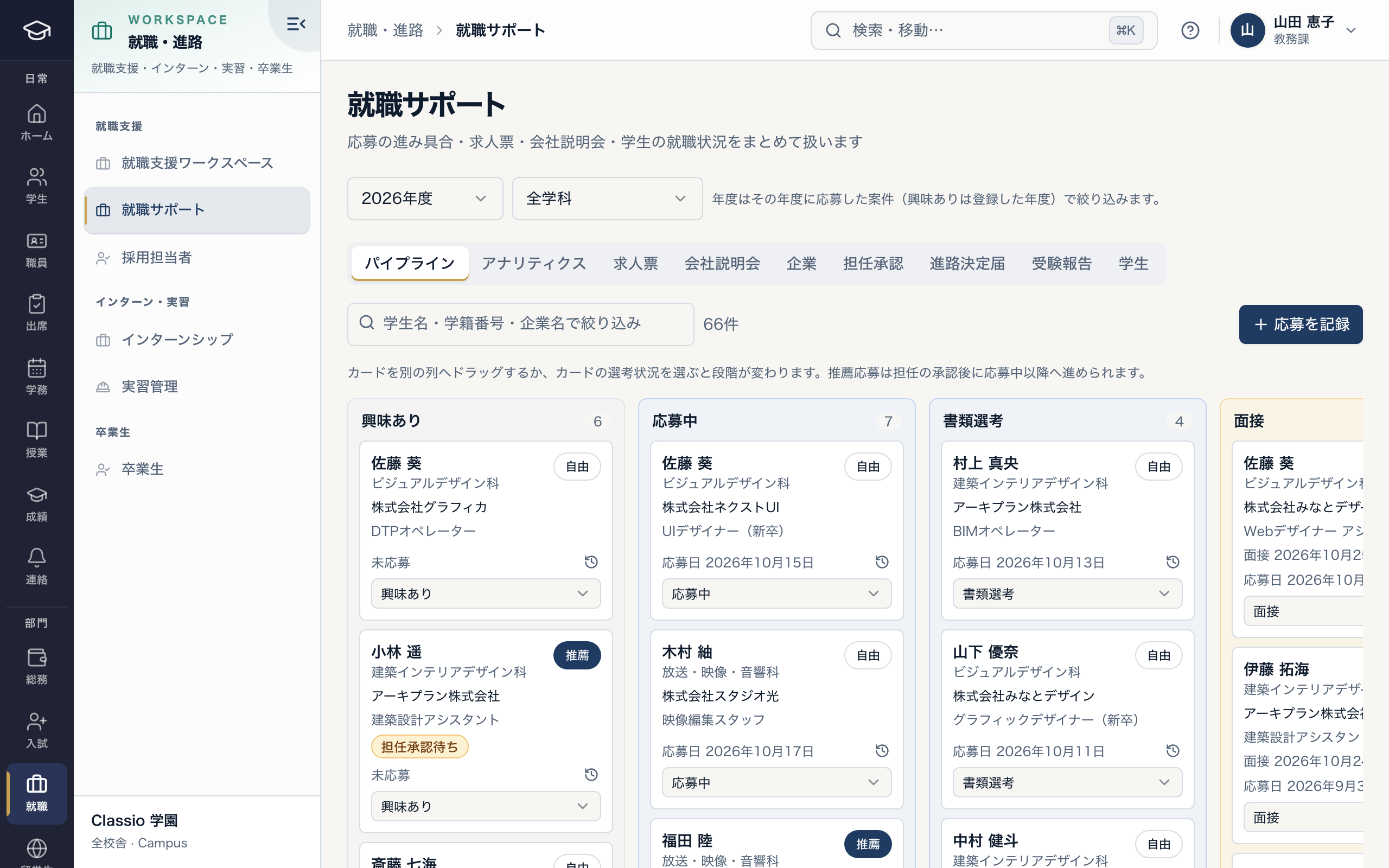
Applications by selection stage
- Referrals move past applied only after homeroom approval
- Postings, company sessions, homeroom approval and decision reports beside the pipeline
- Referral and open applications kept apart
Record stages and advising, and confirm outcomes
Applications sit in columns from interested to offer, accepted, declined and rejected; the career office moves the cards. Interview, offer and acceptance notify the student, and acceptance records the outcome as employed.
Students submit a decision report when an offer or further study is settled; the career office checks it into the career file. Exam reports can be shared anonymously with younger students or kept private. Advising notes are read only by staff and teachers.
Offer and placement rates use students seeking work as the denominator, also by department.
Placements and internships: assignments, logs, evaluations
Each placement records the site, period, required days and supervising teacher, and moves from assigned to in progress to completed. Students submit one log per day of the placement; once the teacher has reviewed a day it can no longer be changed. Staff enter the site supervisor’s evaluation.
Internships can be posted by the school or requested by recruiters and published after the school approves. Once an internship is in progress an evaluation link is created, and the host can submit one evaluation without signing in.
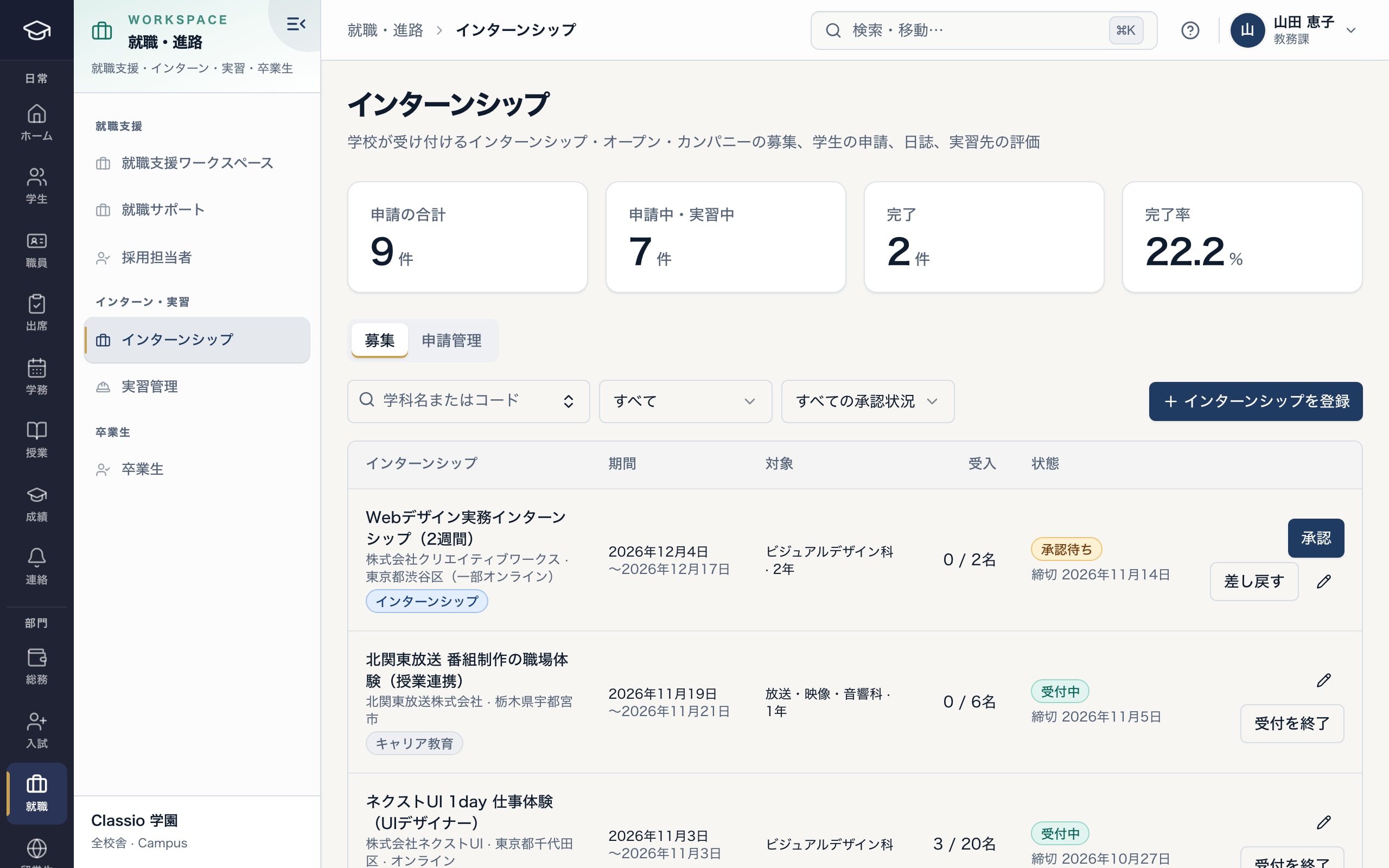
Approve company postings and follow applications
- Applications, in progress and completed
- Types from open company days to internships
- Company postings are published after school approval
Portfolios shared only with the people who should see them
Students add coursework and projects to My works with images, video and PDFs. Until published only the student and their teachers see them; publishing to the school gallery shows them to the school’s teachers, students and guardians and to approved recruiters — never outside the school.
A submission set per employer creates a link showing only the chosen works, with an optional expiry; it can be switched off at any time and shows view counts. The school can comment, feature or hide with a reason, but only the student can edit or delete a work.
Course completion or qualifications can also be recorded as badges issued by the school.
Awkward cases
- A student declines an offer
- Move the card to declined; acceptance and declining are recorded by the school as the student’s answer.
- A recruiter wants to contact a student
- Recruiters ask the school; once approved, a message thread with school staff starts. Student contact details and numbers are never disclosed.
- A referral is stuck because the homeroom teacher is away
- An administrator can decide instead; students without a homeroom teacher this year are decided by the career office.
- A work needs checking
- The career office or an administrator hides it with a reason; it disappears from the gallery and links at once.
Differences by kind of school
- Vocational schoolsHomeroom approval of referrals, placement logs and portfolio submission sets.Vocational schools
- Universities and junior collegesMostly open applications, decision reports and placement rates.Universities
- Japanese-language schoolsInternational students’ job offers are checked with the international office alongside residence changes.International students
Which plans include it
Career support, placements, internships, portfolios and badges are included from STANDARD for vocational schools, Japanese-language schools and universities. The alumni register and portal are from PROFESSIONAL.
See pricingWhat it does not do
- Staff enter placement supervisors’ evaluations; the no-login evaluation link is for internships.
- Recruiter access lasts 12 months from approval and is extended by the school.
- Badge pages show the issuer, date, expiry and status; they are not digitally signed credentials.
Start from how you work today
See the career screens in the demo.
No registration: three minutes with sample data in career support, placements and internships. Tell us how you handle postings and referrals today and we will suggest how to start.