In this article
This area covers students' job hunting, off-campus practical training, and staying connected after graduation. Career advisors and Teachers manage how applications are progressing, and Students apply for jobs and placements. Recruiters use it to post jobs and view students' work. Recruiters contact students through the school; Career advisors, Administrators and Academic administrators review those requests on the Requests to contact students (学生への連絡申請) tab of Recruiter requests (採用担当者申請) in Requests & approvals (申請・承認). The pages you see depend on your role, and some pages may not appear depending on your plan or module settings.
Recruiter invitation links open at the inviting school’s address.
Career support (就職支援)
Screen
就職支援ワークスペース
The workspace for Career advisors. Check, day by day, applications in the selection process, interviews awaiting follow-up, and follow-up after job offers.
Screen
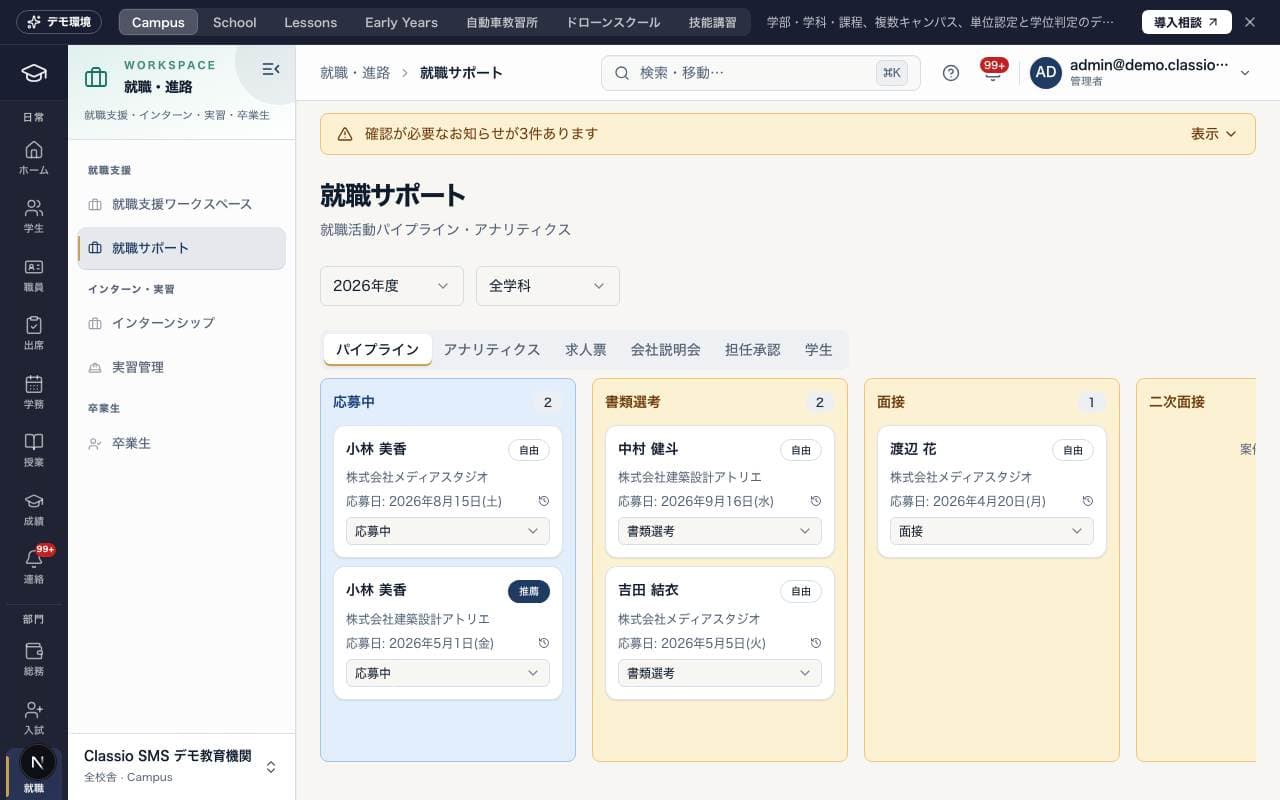
就職サポート
This screen brings job hunting together in one place, with the tabs Pipeline (パイプライン), Analytics (アナリティクス), Job postings (求人票) and Company info sessions (会社説明会). Staff also see the Homeroom approval (担任承認) and Students (学生) tabs, and Recruiters see Recommended students (おすすめ学生). For how to use it, see How Career support works.
The public demo shows the career pipeline, analytics, job listings and information sessions. Status changes, approvals, counseling records and exports are unavailable.
Portfolio (ポートフォリオ)
Screen
ポートフォリオ閲覧
Where school-approved Recruiters view the work published by that school's students. Search and filter by department or type. Contact with students goes through the school.
The public demo allows viewing works without commenting, featuring, editing or notifications.
Internships & practical training (インターン・実習)
Screen
インターンシップ
This screen handles company placements (企業実習) arranged by the school. Staff manage placement openings and student applications under Placement list (実習一覧) and Application management (申請管理). Students apply for open placements and, while taking part, submit training journal (実習日誌) entries.
Screen
実習管理
This screen shows the status of practical training assignments. It shows the number in progress, waiting to start and completed, a list of current assignments (host organization, start date and number of journal entries), and a list of host organizations.
Alumni (卒業生)
Screen
卒業生
This screen is for managing the alumni directory and alumni employment status. You can find graduates in Directory (ディレクトリ), and depending on your role you also see the Career statistics (キャリア統計), Analytics (アナリティクス), Events (イベント) and Bulk registration (一括登録) tabs.
Was this article helpful?